
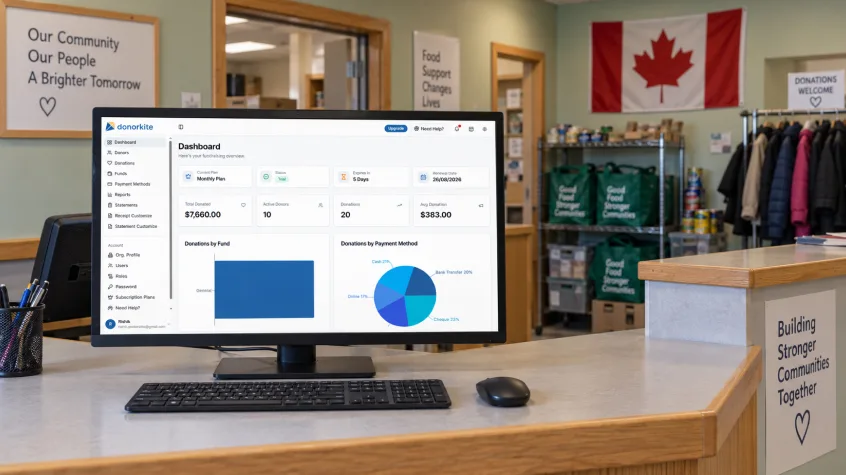
For Canadian charities, issuing a donation receipt involves more than adding a donor’s name and contribution amount to a document. The receipt needs accurate information, an identifiable number and a clear connection to the donation behind it. Your team also needs to send it to the donor and find it again when questions arise.
When donor details sit in one spreadsheet, donations in another and receipts in separate folders, even a straightforward task can take longer than it should.
The best tax receipt software makes this everyday work easier. It connects donor records, donation tracking, receipt preparation and email delivery so your team can complete the process in one platform.
DonorKite brings these tasks together for $29 USD per month. Canadian charities can add donors, record the donations they have received, customise their receipt template and email receipts without moving between separate tools. Its focus on simple administration makes it a practical option for organizations looking for affordable donation management software.
This guide explains the features that matter, how DonorKite supports the donation-to-receipt workflow and what to check before choosing software for your charity.
What Does Tax Receipt Software Do for Canadian Charities?
Tax receipt software helps charities prepare and manage donation receipts using the donor and contribution information they record. It reduces the need to recreate the same document each time someone gives.
For example, when an existing donor makes another contribution, your team should be able to select their profile, add the donation details and generate the receipt using information already stored in the system.
Good charity receipt software also helps answer everyday questions: Which donor made this contribution? Which fund was it intended for? What receipt number was assigned? Has the receipt been emailed?
DonorKite connects these activities. It manages records for offline donations received through your organization’s existing processes, including cash, cheques and bank transfers. Your team records the contribution and handles the related donor information and receipt within the platform.
For a Canadian charity with limited administrative time, this connection is often more useful than a receipt template alone.
What Makes the Best Tax Receipt Software a Good Fit?
Choosing the best tax receipt software starts with the work your team actually performs. A small community charity may need one person to manage donors, record contributions, send receipts and respond to donor enquiries.
That person needs a clear process they can repeat confidently.
When evaluating Donation Receipt Software for Canadian Registered Charities, look for:
Donor profiles that keep contact information and giving history together.
Straightforward donation entry with dates, amounts, funds and payment methods.
Receipt templates suitable for Canadian receipting requirements.
Consistent receipt numbering.
Email delivery from the donation workflow.
Receipt activity and delivery information.
Donor statements and useful donation reports.
Pricing your charity can budget for as its records grow.
DonorKite is worth considering when these are your main requirements. Its value comes from connecting routine tasks in a system your team can use day to day.
Canadian Receipt Requirements: What Your Software Should Support
Before choosing CRA donation receipt software, it helps to understand what an official receipt must contain.
For a cash gift, required information includes the charity’s registered name and address, registration number, a unique receipt serial number, the donor’s full name and address, relevant dates, the issuing location, the gift amount, any advantage and the eligible amount. The receipt also needs the required official-receipt statement, an authorized signature, and the CRA’s name and website address.
Additional details apply to non-cash gifts. A charity must also determine whether a contribution qualifies for an official receipt in the first place. Being a non-profit organization does not, by itself, establish eligibility to issue official tax receipts.
These requirements explain why tax-compliant donation receipts software should be assessed using an actual sample receipt. A professional-looking document needs the right content as well as a clear layout.
DonorKite provides a Canadian receipt template that your charity can configure with its organization details and branding. Check the completed template against CRA requirements and the types of gifts you receive before issuing receipts.
When comparing CRA compliant donation receipt software, treat compliance as a combination of appropriate software, correct configuration and accurate donation information. Your charity remains responsible for the eligibility and accuracy of the receipts it issues.
DonorKite Features That Simplify Donation and Receipt Management
Donor Profiles and Connected Giving History
Donor management software provides the foundation for reliable receipting. If a donor’s name, postal address or email is incorrect, that mistake can follow through to the receipt or its delivery.
DonorKite keeps donor details and donation history together. Your team can maintain contact information and review previous contributions before recording another donation.
Consider a supporter who gives several times during the year. Keeping each contribution connected to one profile makes it easier to answer a question about their giving without searching through separate spreadsheets.
The practical benefit of donor management software is continuity: the next person helping that donor can work from the same organized record.
Donor Import, Export and Duplicate Management
Moving to a new system is easier when existing donor information can be brought across. DonorKite supports donor import and export, along with duplicate merging to help consolidate records.
Before importing, check names, addresses and email details. Two entries with similar names may belong to different people, so review potential duplicates carefully before merging them.
Starting with clean records makes subsequent donation entry and receipting more reliable.
Simple Donation Entry
DonorKite lets your team record a contribution against the relevant donor, including its amount, date, fund, payment method and remarks.
This gives the receipt a clear source record. It also preserves useful context: a donation to a building fund can remain distinguishable from a contribution for general charitable activities.
For teams evaluating tax donation receipt software, this connection matters. The donation record should support the receipt, while also helping staff understand why and how the contribution was received.
Funds and Payment Methods
A charity may receive donations for several purposes. Organizing those contributions by fund helps staff maintain a clearer picture of the work donors supported.
DonorKite supports funds and configurable payment methods, so staff can record contributions consistently. Agreeing on standard names during setup helps prevent records such as “Cheque,” “Cheque Donation” and “Payment by Cheque” from being used inconsistently for the same method.
These small decisions make later reviews easier and reduce the need to interpret unclear spreadsheet entries.
Automatic Receipt Numbering
Receipt numbers help staff identify and locate individual documents. DonorKite supports automatic numbering, keeping this step within the donation workflow.
During setup, review your numbering preferences and how your existing records will relate to newly issued receipts. Your team should be able to identify a receipt clearly and trace it back to the right contribution.
Reliable numbering is a practical feature to test when choosing charity receipt software, especially when several people help with administration.
Canadian Receipt Templates and Customisation
DonorKite’s receipt customisation options include your organization’s logo, signature, labels and fonts. These allow your charity to present receipts consistently while using the Canadian template as the starting point.
Customisation is useful when your charity needs to update its branding or present contact details more clearly. Keep required receipt information visible and readable as you make changes.
If you have additional requirements, check that the resulting template supports them before using it for actual donations. This is especially relevant to gifts involving donor benefits or non-cash property.
For charities seeking tax-compliant donation receipts software, a useful template is one that combines the required information with a format staff can maintain consistently.
PDF Receipts and One-Click Email Delivery
DonorKite generates PDF receipts using recorded donation information. With the donor details and receipt configuration in place, your team can send the receipt by email in one click from the donation workflow.
This removes several repetitive actions from routine administration. Staff do not need to recreate the document and manually transfer its details into a separate email process each time.
Email Donation Receipts software is particularly useful when donors expect a receipt they can find in their inbox and retain for their records. Verify the recipient’s email address before sending to avoid preventable delivery problems.
Receipt Activity and Delivery Status
Sending the document is one part of the process. Staff also need enough information to respond when someone says their receipt has not arrived.
DonorKite’s receipt activity timeline and delivery status help your team review what happened. Having that information alongside the contribution can make follow-up easier than searching through an individual staff member’s inbox.
This is a useful distinction when assessing Email Donation Receipts software: evaluate how it supports follow-up as well as the initial send.
Annual and Custom-Period Donor Statements
DonorKite supports annual and custom-period statements, allowing your team to prepare a view of a donor’s giving from existing records.
A supporter may ask for a summary covering the previous calendar year or another period. Connected records make that request easier to handle.
A giving statement and an official tax receipt serve different purposes. Check a document’s contents and intended use before treating a statement as an official donation receipt.
Donation Reports, Cloud Access and Support
The monthly plan includes donation reports, cloud-based access and email support. These support the wider administrative work surrounding receipts, including reviewing contributions and helping authorized staff work with the records.
DonorKite also includes unlimited donors and donations, so the published plan does not require you to choose a higher donor-record tier as those records grow.
Register on DonorKite to try the workflow for free. No credit card is required for the free trial. Add a donor, record a donation and explore receipt customisation and email delivery before subscribing.
Can Canadian Charities Send Official Donation Receipts by Email?
Yes. CRA guidance allows official donation receipts to be emailed, with precautions for protecting the documents and the information they contain.
The guidance addresses non-editable formats, protection against unauthorized access, encryption, electronic signatures and keeping copies of emailed receipts. When reviewing CRA donation receipt software via email, check these controls as well as the receipt’s content. A PDF attachment alone does not demonstrate that every safeguard is in place.
DonorKite brings receipt generation and email delivery into the same workflow. Your charity should review the generated document and confirm the relevant security and signature arrangements before relying on it for official electronic receipting.
The practical test for CRA donation receipt software via email is therefore broader than whether an email arrives: can your team prepare an accurate receipt, deliver it appropriately and retain the records it needs?
DonorKite Pricing: $29 USD per Month
DonorKite’s published monthly price is $29 USD per month. The plan includes unlimited donors and donations, donor management, email receipts, donation statements, funds and campaigns, donation reports, cloud access and email support. DonorKite lists no setup fees and allows cancellation at any time.
Pricing detail | DonorKite |
Monthly subscription | $29 USD |
Donors and donations | Unlimited |
Setup fee | None |
Free trial | Available; no credit card required |
The twelve-month figure is a calculation using the monthly rate, not a separate annual-plan offer. Canadian charities should budget for the conversion from USD to CAD and any applicable taxes or card-provider charges.
When choosing affordable donation management software, consider the cost of the administrative process alongside the subscription. Time spent copying donor details, preparing separate documents and answering receipt enquiries is also part of the workload.
For a charity that needs the included features, DonorKite offers a straightforward price to evaluate against that work. You can test the process before deciding whether it provides enough value for your team.
How to Manage a Donation and Email Its Receipt in DonorKite
1. Set Up Your Charity and Receipt Template
Add your organization’s details and configure the Canadian receipt template. Review the registration information, signature, numbering and required receipt content before beginning routine use.
2. Add or Select the Donor
Create the donor’s profile or select an existing record. Confirm their name, address and email so the receipt uses the correct information.
3. Record the Donation Received
Enter the contribution amount and date, choose the fund and payment method, and add relevant remarks. Confirm that the contribution is eligible for the receipt you intend to issue.
4. Check the Receipt Details
Review the information used to generate the receipt. A brief accuracy check is particularly useful when recording a new donor or handling an unfamiliar type of contribution.
5. Email the Receipt and Keep the Record Connected
Use the email receipt action to send the document. The connected donor and donation records give your team a place to return when reviewing the contribution or responding to an enquiry.
This is the everyday value of tax donation receipt software: a repeatable process from the recorded gift to the donor’s receipt, with less re-entry along the way.
Start your free DonorKite trial - no credit card needed. See how adding donors, recording donations and emailing receipts fits your charity’s daily work.
How to Choose the Right Software for Your Charity
Test a Complete Donation Workflow
When comparing Donation Receipt Software for Canadian Registered Charities, use a realistic example during your trial. Follow it from donor entry through to receipt generation and review.
Notice where your team needs help, where information is repeated and whether the finished document contains what your charity requires. This provides more useful evidence than a feature list alone.
Check Canadian Receipting Details
Evaluate CRA donation receipt software using your actual receipting needs. Check ordinary cash donations first, then any more complex gifts your charity receives.
When assessing CRA compliant donation receipt software, ask how the template, signature arrangements, document protection and record retention support your obligations. Confirm anything that is not clear during the trial.
Review Email Delivery and Follow-Up
Test Email Donation Receipts software with an authorized test address. Check readability, delivery information and how easily staff can locate the corresponding record afterwards.
For charities comparing CRA donation receipt software via email, this review should cover both convenience and the CRA’s electronic-receipting guidance.
Consider the Whole Donor Record
Useful donor management software should make a repeat supporter easy to recognize and assist. Review how your team will maintain contact details, avoid duplicates and prepare a giving summary.
The benefit becomes clearer over time, as each additional contribution builds on an existing record.
Judge Affordability Against Actual Use
The right affordable donation management software should fit your budget and the tasks your team performs regularly. Identify your essential requirements, confirm that they are included and use the trial to assess the workflow.
At $29 USD per month, DonorKite gives charities a clear starting point for that decision.
When DonorKite Is the Best Fit for a Canadian Charity
DonorKite is a strong fit for Canadian charities that want to manage donor details, offline donation records and emailed receipts together at a straightforward monthly price.
Its practical advantage is the connection between those tasks. A donor’s profile supports the donation record; the recorded contribution supports the receipt; and the receipt activity remains available for follow-up. Statements and reports extend the usefulness of the same information.
For teams evaluating charity receipt software, this can mean less repetitive administration and a clearer process for staff and volunteers. For those choosing tax donation receipt software, it provides a way to assess the complete workflow before committing.
The best tax receipt software for your charity is the one that meets your receipting requirements and is practical enough to use consistently. DonorKite is worth testing when simplicity, connected records and predictable subscription pricing are your priorities.
Register on DonorKite and start your free trial with no credit card required. Add your donors, record their contributions and explore a simpler way to prepare and email donation receipts.