
A donor opens your receipt after supporting a cause they care about. They should immediately recognize your organization, understand the donation details, and know whom to contact if something needs correcting. A clear receipt makes that experience easier. An outdated logo, confusing labels, or missing information creates unnecessary questions.
Customizable donation receipt software helps your organization create a consistent format for acknowledging contributions. It brings your identity into the document while keeping essential donation information easy to find.
DonorKite connects donor records, donation management, and emailed receipts in one system. Your team can maintain the information behind each contribution and use it throughout the receipt process, rather than preparing a separate document every time someone gives.
This guide explains what to customize, how receipt automation supports your team, and what to check before sending your first branded receipt.
Ready to try the process with your own organization? Register for DonorKite and explore how your donation records and receipts work together.
What is customizable donation receipt software?
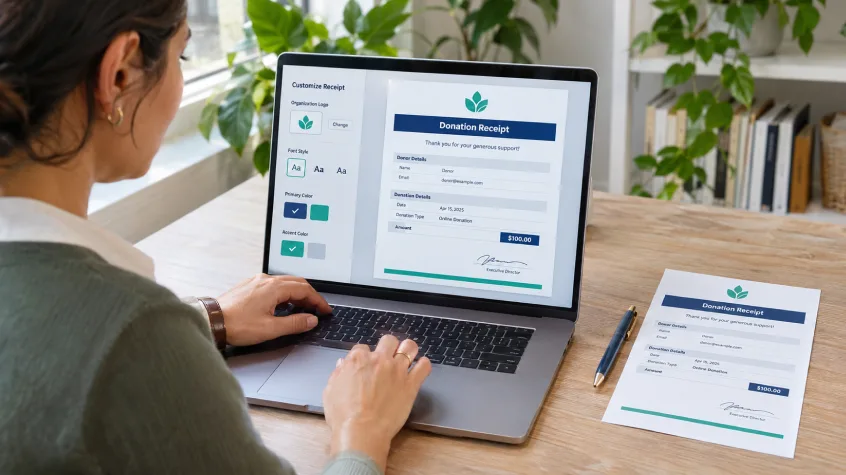
Customizable donation receipt software lets nonprofits and charities adapt receipt presentation and supported content to their needs. Depending on the platform, this can include the organization’s logo, signature, labels, fonts, and identifying information.
The purpose is to create a reusable receipt format that looks familiar to donors and works consistently for your staff. Once your organization agrees on the format, the changing donation details can come from the relevant records.
DonorKite supports receipt customization through logos, signatures, labels, and fonts. Its donation receipt software for nonprofits also connects receipt administration with donor and contribution information.
That connection matters when a supporter gives again. Your team should be able to acknowledge the new contribution using the same approved presentation without rebuilding the receipt or losing track of earlier donations.
Why your donation receipts should match your organization
Help donors recognize the sender
A supporter may donate to several organizations during the year. Your receipt should make it easy to identify which organization received the contribution.
Use your current logo and accurate organization details. If your public-facing name differs from your registered name, make the relationship clear while retaining any legally required identification. Donors should not have to search through previous emails to understand who issued the document.
Give staff one dependable format
When different volunteers keep their own receipt templates, small differences can accumulate. One person may use an old address, another may change the wording, and a third may leave out a useful contact detail.
An agreed format gives everyone a common starting point. Assign a person to maintain it and review changes before the updated version becomes part of your routine process.
Make receipts easier to read and retain
Good presentation serves a practical purpose. Donors need to find the contribution amount, date, and identifying details quickly, whether they open the receipt on a phone or print it for their records.
Use a readable font, sufficient spacing, and clear labels. Keep branding proportionate so it supports the document’s purpose. A large logo should never push essential donation information into an awkward position.
What to customize on your donation receipts
Start with the information donors need, then decide how to present it. The most useful customization choices improve recognition, clarity, or administrative consistency.
Organization logo and identifying details
Choose a clean logo file that remains readable at a modest size. Check the organization name, address, and contact information wherever they appear in the receipt.
Use your registered details where required. An attractive brand name alone may not provide all the identification needed for a tax acknowledgment.
Signature and authorization
Where an authorized signature is appropriate or required, confirm whose signature should appear and who may approve its use. Review this when responsibilities change within your organization.
A signature should be clear enough to reproduce without dominating the page. Avoid using a low-resolution image that becomes blurred in the PDF.
Labels and fonts
Labels should explain what each value means. For example, a donation date and a receipt issue date describe different events. If both appear, readers should be able to distinguish them easily.
Choose fonts for readability and test the result with longer donor names and addresses. A format that works for a short sample name may need adjustment when real records contain more information.
Acknowledgment wording
Check that the available receipt fields can accommodate the wording your organization needs. Confirm which text can be configured before settling on your final format.
Thank-you language should be warm and brief. Any required tax statements should remain complete and easy to identify. Avoid adding claims about tax deductibility unless they are appropriate for the contribution and your organization.
Offline donation receipt software for contributions received outside an online form
Many organizations receive contributions by cash, check, or bank transfer. These gifts still need accurate records and appropriate acknowledgments.
Offline donation receipt software helps staff document those contributions and prepare receipts after the money has been received. Here, “offline donations” describes the giving method; it does not mean the application works without an internet connection.
DonorKite supports recording offline contributions and organizing them with donor details, funds, and payment methods. Its charitable donation tracking software keeps these records connected with receipt administration and giving history.
For example, imagine a community organization receives a check supporting its food program. A staff member should confirm the donor’s identity, record the actual contribution date and amount, select the correct fund, and review the information before issuing the receipt.
The same care should apply to a cash gift received at an event. Record the actual donor accurately and reconcile the contribution with your organization’s collection records. A branded receipt is useful only when it acknowledges the right gift.
Automatic donation receipt software that reduces repeated work
Preparing each receipt manually can involve several small tasks: copying the donor’s name, entering the amount, updating the date, saving a document, and attaching it to an email. Repeating these steps creates opportunities for mistakes.
Automatic donation receipt software reduces repetitive preparation by using recorded donor and donation information. Your approved receipt format provides consistency while the relevant contribution supplies the changing details.
DonorKite supports PDF receipt generation and receipt numbering. Its published workflow also includes emailing a receipt when a donation is saved. You can explore its automatic donation receipt software to understand how these activities fit together.
Before relying on automation, decide who checks the donation record and when. If sending occurs during the save process, review the recipient, amount, date, and fund before saving.
Automation also makes the quality of your template more important. An incorrect address or unsuitable statement can be repeated across many receipts. Test the format carefully whenever you change it.
Email donation receipts software for faster delivery
A finished receipt still needs to reach the donor. Email donation receipts software helps bring delivery into the same administrative process, reducing the need to switch between document folders and personal inboxes.
DonorKite provides email receipt delivery and donation activity records. This gives your team a practical starting point when a supporter asks about a receipt connected with a recorded contribution.
Build a simple delivery routine around that capability:
Confirm the donor’s email address before issuing the receipt.
Test a sample PDF on a phone and a desktop screen.
Check that the organization’s identity and contact details are clear.
Review the available sending or delivery status when a donor reports a missing receipt.
Follow a consistent process for providing another copy of an existing receipt.
Do not assume that a sent status proves someone received or opened an email. A mistyped address, mailbox filter, or delivery problem may still need attention.
The benefit of email donation receipts software is a more manageable acknowledgment process. Your team should know what was issued and have a clear way to help when a donor needs support.
Want to see how your branding looks in a real receipt? Try DonorKite, configure your receipt details, and review a sample before using the format for live donations.
What to check in Tax-Compliant Donation Receipts Software
Organizations searching for tax-compliant donation receipts software need to consider the content of the receipt as carefully as its appearance. A logo, signature, and receipt number do not establish compliance by themselves.
The appropriate acknowledgment depends on your jurisdiction, organization status, contribution type, and whether the donor received anything in return. Treat customization as a way to support the required format, with a review process to confirm the result.
Check the rules that apply to your organization
For U.S. charitable contributions of $250 or more, donors generally need a contemporaneous written acknowledgment to substantiate a deduction. The acknowledgment must include applicable contribution details and information about goods or services provided in return. These are acknowledgment requirements, not a guarantee that a particular gift is deductible.
Canadian registered charities have a different official receipt checklist. Required information includes items such as the charity’s registration number, a unique serial number, donor details, the eligible gift amount, and an authorized signature. Additional requirements apply to non-cash gifts.
These examples show why one generic template should not be assumed suitable everywhere. Check the complete requirements for your circumstances before approving a receipt.
Review a completed sample
When evaluating tax-compliant donation receipts software, inspect the document produced from a realistic donation record. Check whether all required fields and statements can be included, whether the information is correct, and whether it remains readable after customization.
DonorKite’s customization tools can support receipt preparation. Your organization still needs to confirm that the completed receipt is appropriate for its jurisdiction and the specific gift. Ask your accountant or relevant adviser to review uncertain requirements.
How to set up a consistent receipt process with DonorKite
1. Agree on the receipt content
Gather your organization’s current logo, identifying details, approved signature, and required acknowledgment wording. Separate details that remain constant from information that changes with each donation.
Decide who owns the receipt format and who approves updates. This prevents well-intentioned edits from introducing inconsistent wording.
2. Review donor and contribution information
Check donor names and contact details before issuing receipts. For repeat supporters, locate the existing profile so the contribution remains associated with the correct giving history.
Confirm the contribution amount, date, fund, and payment method against your source records. Resolve discrepancies before generating the acknowledgment.
3. Configure and test the format
Apply the supported customization options and review the output. Test longer names, multi-line addresses, and different donation amounts to see whether the format remains clear.
Inspect the PDF on screen and in print. Look for small text, clipped information, unclear labels, and unnecessary page breaks. Review required wording alongside the visual layout.
4. Check delivery and future retrieval
Use a controlled sample to confirm how receipt generation and email sending work in your setup. Make sure the staff responsible understand the point at which a receipt will be sent.
Then practice locating the related record. A useful setup should support the follow-up task as well as the initial acknowledgment.
5. Review changes before using them
Recheck the receipt when your organization changes its address, branding, authorized signatory, or approved wording. Keep a record of the approved format and the date of the change.
Establish a correction procedure too. Staff should know how to handle an error without creating conflicting versions or recording the same donation twice.
Create receipts that support your organization’s everyday work
Customizable donation receipt software gives your team a way to combine recognizable presentation with consistent administration. The receipt should reflect your organization while making the contribution details easy to understand.
DonorKite brings receipt customization together with offline donation records, PDF generation, email delivery, and donor history. These capabilities help teams manage acknowledgments as part of their regular donation workflow.
Start with one approved format, test it against real requirements, and make sure your staff understand the process. A clear, repeatable approach helps your organization acknowledge support with greater consistency.
Register for DonorKite to explore customizable donation receipts for your nonprofit, charity, church, or foundation.
Frequently asked questions
What is customizable donation receipt software?
Customizable donation receipt software lets organizations adapt supported receipt elements, such as logos, signatures, labels, and fonts, while using donor and donation information to prepare consistent acknowledgments.
Can DonorKite help with offline donation receipts?
Yes. DonorKite supports recording offline gifts such as cash, checks, and bank transfers, then managing the related receipt. Offline donation receipt software refers to the giving method, not internet-free access.
How does automatic donation receipt software work?
Automatic donation receipt software uses recorded contribution information to reduce repeated document preparation. DonorKite supports PDF receipts, receipt numbering, and email sending within its donation workflow.
Can I use email donation receipts software for cash donations?
Yes. A donation received in cash can still be acknowledged by email once it is accurately recorded. Check the donor’s email address and receipt details before sending, and retain the underlying contribution record.
Does receipt customization guarantee tax compliance?
No. When choosing tax-compliant donation receipts software, check the completed receipt against the rules that apply to your organization and gift. Customization helps prepare the document; it does not determine eligibility.