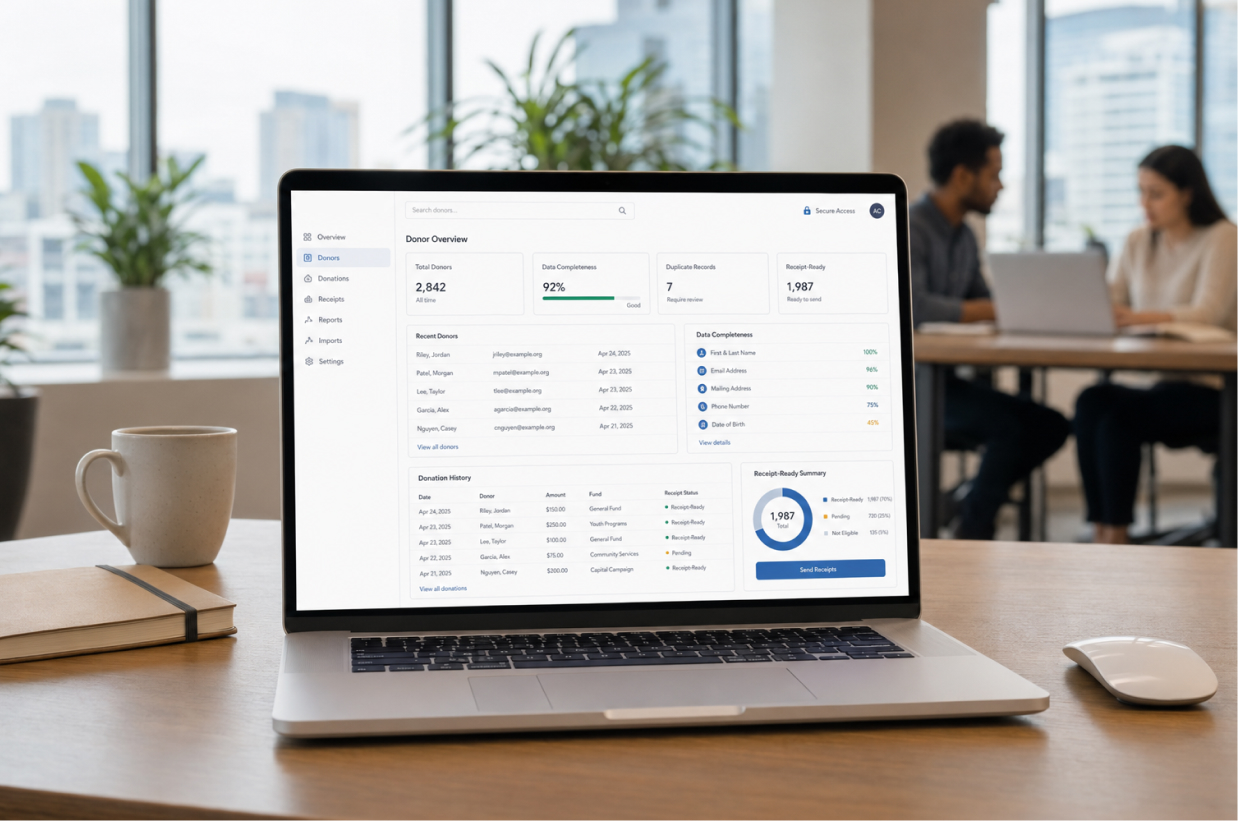
Nonprofits rely on donor information every day. It is used to record contributions, generate receipts, prepare reports and maintain relationships with supporters. When that information is incomplete or inaccurate, even routine administrative work becomes difficult.
A misspelled donor name can appear on a tax receipt. Duplicate profiles can divide one supporter’s donation history across several records. An outdated email address can prevent an important document from reaching its recipient. These may appear to be small data problems, but they can affect donor trust, reporting accuracy and staff productivity.
Effective donor data management helps nonprofits maintain reliable donor profiles, connect every offline donation with the correct supporter and keep records ready for receipt generation. It also gives authorized team members a dependable source of information instead of forcing them to search through spreadsheets, inboxes and paper files.
What Is Donor Data Management?
Donor data management is the process of collecting, organizing, updating, protecting and using information about an organization’s donors and their contributions.
It covers more than storing names and email addresses. A complete donor record may include:
- Full legal name
- Mailing address
- Email address and phone number
- Preferred communication channel
- Donation dates and amounts
- Donation methods
- Funds, campaigns or programs supported
- Receipt generation and delivery history
- Notes and relevant donor preferences
Good donor data management ensures that this information remains accurate, accessible and connected throughout the donor relationship.
For organizations receiving cash, checks, bank transfers and other offline contributions, this connection is especially important. Staff need to record the contribution manually, associate it with the correct donor and generate the appropriate receipt without creating conflicting records.
Why Accurate Donor Data Matters
Donor information supports several areas of nonprofit administration. When records are reliable, staff can work faster and communicate with greater confidence.
Accurate donation receipts
Donation receipts depend on correct donor and contribution information. The donor’s name, donation amount, contribution date and receipt details must be taken from a dependable record.
If staff copy information manually from different spreadsheets or documents, mistakes become more likely. A centralized record helps reduce repeated data entry and provides a consistent source for generating receipts.
For US nonprofits, accurate records are particularly important when providing written acknowledgments. The IRS states that donors need a contemporaneous written acknowledgment from the qualified organization to claim a deduction for an individual contribution of $250 or more. The acknowledgment should include specific information about the contribution and whether goods or services were provided in exchange. IRS guidance on written acknowledgments
Software can support the administrative process, but each organization remains responsible for ensuring its receipts and acknowledgments meet applicable requirements.
Complete donation histories
A donor’s giving history should show more than their latest contribution. Staff may need to review when the donor first contributed, how frequently they give, which programs they support and whether their receipts were delivered.
When donations are spread across duplicate profiles, that history becomes unreliable. One record may show a check donation, while another contains a later cash contribution from the same person.
Combining contributions under the correct donor profile gives staff a clearer view of the relationship.
Dependable reports
Reports are only as reliable as the information behind them. Incomplete or duplicated donor records can distort:
- Total donor counts
- New and returning donor numbers
- Donation totals
- Campaign performance
- Receipt status
- Donor retention analysis
Clean data provides a stronger foundation for internal reporting, financial review and operational decisions.
More relevant donor communication
Reliable information allows nonprofits to communicate with supporters based on their actual relationship with the organization.
For example, staff can identify first-time donors, recurring supporters, inactive donors or people who regularly contribute to a particular program. This helps the organization send more relevant updates rather than treating every donor in exactly the same way.
These insights can also support broader nonprofit donor retention strategies by helping staff recognize patterns and follow up appropriately.
Common Donor Data Problems
Most donor databases do not become disorganized overnight. Problems develop gradually as more people enter information, spreadsheets are imported and donors use different contact details.
Duplicate donor records
Duplicate profiles are among the most common donor data problems. They can appear when:
- A donor uses a different email address
- Their name is entered with a different spelling
- One staff member records a contribution without checking existing profiles
- Spreadsheet data is imported without reviewing matches
- A household donation is recorded under different family members
Duplicates divide donation histories and can result in repeated messages or inconsistent receipts.
Before creating a new donor, staff should search existing records using several identifiers, such as the donor’s name, email address and phone number.
Incomplete donor profiles
A record may contain a donor’s name and donation amount but lack the contact details needed to deliver a receipt.
Organizations should define the minimum information required for a usable donor profile. The exact fields will depend on internal policies and applicable requirements, but consistency is essential.
Required fields and validation checks can help staff notice missing information before saving a record.
Inconsistent formatting
The same information may be entered in several ways. Phone numbers can include different country codes, names may use inconsistent capitalization and addresses may follow different formats.
Standardized entry rules make searching, filtering and reporting easier. They also improve the appearance of generated receipts and donor communications.
Outdated information
Donors change email addresses, phone numbers and mailing addresses. Old information should not remain active indefinitely without review.
When a receipt fails to deliver or a donor provides updated details, staff should correct the central profile rather than changing only one isolated document.
Disconnected donation and receipt records
A contribution may be recorded in one system while its receipt is created elsewhere. This makes it difficult to determine whether a receipt was generated, delivered, corrected or reissued.
Connecting donor, donation and receipt information creates a more reliable administrative trail.
How to Build a Reliable Donor Data Management Process
Technology helps, but nonprofits also need clear internal procedures.
Establish one central source of information
Select one system as the authoritative source for donor and donation data. Staff should know where records must be created and updated.
A central donor database software system can bring donor profiles, offline donations, giving histories, reports and receipts together. It reduces dependence on separate spreadsheets and personal inboxes.
Define standard data-entry rules
Create simple rules for how staff should enter:
- Individual and organization names
- Phone numbers
- Mailing addresses
- Donation methods
- Fund or campaign names
- Notes and communication preferences
These rules should be documented and included in staff training.
Check for existing donors first
Before adding a new profile, search the database for possible matches. Checking more than one field helps detect records that contain slightly different information.
A review step may take a few seconds, but it can prevent years of fragmented donor history.
Connect each donation to a donor profile
Every offline contribution should be associated with the appropriate donor whenever sufficient identifying information is available.
This connection allows staff to view complete donation histories, prepare reports and generate receipts using information already stored in the system.
Review imported records
Spreadsheet imports can save time, but they can also introduce duplicates and inconsistent formatting.
Before importing donor data:
- Remove unnecessary columns.
- Standardize names, dates and phone numbers.
- Identify obvious duplicate rows.
- Confirm how spreadsheet fields map to database fields.
- Test a small sample before importing the entire file.
- Review the completed import for errors.
Keep an approved backup of the original file until the import has been checked.
Schedule regular data reviews
Donor database cleanup should be an ongoing responsibility. Depending on donation volume, a nonprofit may conduct monthly, quarterly or campaign-based reviews.
A regular review can look for:
- Possible duplicate profiles
- Missing contact information
- Invalid email addresses
- Donations without connected donors
- Receipts with unresolved delivery issues
- Inconsistent campaign or fund names
- Accounts belonging to former team members
Keeping Donor Data Secure
Donor records may contain personal and financial-administration information. Nonprofits should collect only what they genuinely need and protect it throughout its lifecycle.
The Federal Trade Commission recommends understanding what personal information an organization holds, limiting access, storing it securely and disposing of it safely when it is no longer needed. FTC guidance on protecting personal information
Use role-based permissions
Not every team member needs access to every function. A volunteer entering donations may require different permissions from an administrator managing users, reports or receipt corrections.
Role-based access helps organizations restrict sensitive tasks to authorized users.
Remove access when responsibilities change
Permissions should be reviewed when an employee or volunteer changes roles or leaves the organization. Old accounts should not remain active unnecessarily.
The FTC also recommends limiting sensitive information to people who need it for their work and using multifactor authentication where available. FTC cybersecurity guidance
Maintain activity records
Audit logs can help administrators understand who created, modified or corrected a record. This provides accountability and helps investigate unexpected changes.
For receipt administration, it is helpful to know when a receipt was generated, sent, corrected or reissued.
Protect exported files
Downloading donor information into spreadsheets creates additional copies of sensitive data. Exports should be limited, stored securely and removed when no longer required.
Staff should avoid sending complete donor lists through personal email accounts or storing them on unmanaged devices.
Maintain and test backups
Backups support recovery after accidental deletion, system failure or a security incident. NIST recommends maintaining backups and testing them periodically so organizations know their information can be restored. NIST small-business cybersecurity guidance
How Clean Donor Data Improves Receipt Management
Receipt generation becomes easier when donor and donation information is already complete and connected.
A reliable workflow looks like this:
- Staff locate or create the correct donor profile.
- The offline donation is recorded with its date, amount and method.
- The donation is associated with the correct fund or purpose.
- The system uses the stored details to generate the receipt.
- The receipt is delivered through an available channel.
- Its issuance and delivery information remain connected to the donation record.
This process reduces repeated typing and makes it easier to retrieve a receipt later.
If a donor requests a correction or replacement, authorized staff can find the original contribution, review the details and maintain a record of the updated receipt.
When Donor Data Management Software Becomes Necessary
A small organization with only a few donations may be able to maintain records in a spreadsheet for a limited time. As donation volume and team size increase, that approach becomes harder to control.
Software becomes worth considering when:
- Several people update donor information
- Duplicate profiles appear regularly
- Staff cannot quickly find complete donation histories
- Receipts contain preventable errors
- Offline donations are stored separately from donor records
- Reporting requires combining several spreadsheets
- Receipt delivery and reissue history are difficult to verify
- Access to donor information cannot be controlled properly
- Staff spend too much time cleaning information manually
These are signs that the organization needs a structured system, not simply a larger spreadsheet.
How DonorKite Supports Donor Data Management
DonorKite helps nonprofits organize donor information and manage offline donations within one system.
Organizations can use DonorKite to:
- Maintain centralized donor profiles
- Record cash, check and other offline contributions
- View donor donation histories
- Organize donors into useful segments
- Generate donation reports
- Create tax-compliant donation receipts
- Send receipts through email, SMS and WhatsApp
- Manage receipt records and reissues
- Control staff access through role permissions
- Maintain activity information through audit logs
- Import donor and donation records in batches
DonorKite does not collect or process online donations. It is designed to help organizations manage donor records, offline contributions, reporting and receipt administration more efficiently.
Turn Donor Data Into Reliable Donation Records
Accurate donor information is the foundation of dependable donation administration. It helps nonprofits maintain complete giving histories, generate accurate receipts, prepare useful reports and communicate with supporters more appropriately.
The goal is not to collect as much information as possible. It is to maintain the right information, keep it accurate and protect it responsibly.
When spreadsheets and disconnected records make that difficult, DonorKite provides a centralized way to manage donors, offline donations and receipts.
Register for DonorKite or make an enquiry to discuss your organization’s donor data and receipt-management requirements.