

A donor contacts your organization asking for a copy of their receipt. Their contact details are in one spreadsheet, the donation appears in another, and the original receipt is somewhere in an email folder. What should take a moment turns into a search through several disconnected records.
As donations grow, these small administrative gaps become harder to manage. Staff repeat the same data entry, donor histories become incomplete, and preparing statements takes longer than it should.
A CRM for Nonprofit Organizations helps bring that work together. Your team can maintain donor information, record contributions, review giving history, and manage receipts through a connected process.
DonorKite brings these everyday tasks into one platform for nonprofits, charities, churches, foundations, and other organizations that receive donations. It combines donor records with donation management, receipt preparation, email delivery, and donor statements, helping your team spend less time moving information between systems.
Whether you are evaluating a CRM for nonprofits in the United States or a not for profit CRM for a charity in Canada, the United Kingdom, Australia, or New Zealand, start with a practical question: can your team manage a donation from the initial record through to the donor’s receipt without unnecessary extra work?
Register Now and Try DonorKite for Free to explore a simpler way to manage donors, donations, and receipts.
What Should a CRM for Nonprofit Organizations Help You Do?
Nonprofit CRM Software should make it easier to understand who supports your organization and keep their records accurate over time. A contact list is useful, but donation-receiving organizations also need to know what each person contributed, when they contributed, and which receipts relate to those gifts.
Useful CRM software for nonprofits connects these details so staff can answer everyday questions:
Have we already created a record for this donor?
What has this person contributed previously?
Which fund received their latest donation?
What payment method was recorded?
Has the donation receipt been emailed?
Can we prepare a statement for the requested period?
A CRM for nonprofits becomes more useful when these answers sit within the same workflow. Staff should not need to reconstruct the relationship between a donor, a donation, and a receipt every time someone makes an enquiry.
This is where Donor Management Software and Donation Management Software work together. The first organizes the people supporting your organization; the second organizes their contributions. Donation Receipt Software then helps turn those records into documents you can provide to donors.
DonorKite brings these connected tasks into one place, giving your organization a practical system for handling offline donations and the administration that follows.
What Makes the Best Nonprofit CRM Software Right for Your Team?
Choosing the Best Nonprofit CRM Software starts with understanding your organization’s actual work.
A community organization receiving contributions toward several local projects may need clear fund records and reliable receipts. A church may need accessible giving histories and donor statements. A charity may need to import an existing donor database and reduce duplicate entries.
The right system should make those tasks easier for the people responsible for completing them.
Connected Information
A donation should remain connected to the correct donor. Its receipt number, payment method, fund, and related activity should be easy to find without opening several separate tools.
Straightforward Daily Use
Staff and volunteers need a process they can follow consistently. When a system makes basic tasks difficult, teams often return to spreadsheets or maintain unofficial records alongside it.
Useful Receipt Workflows
Look beyond whether the software can produce a document. Check how receipt details are populated, how numbering works, how receipts reach donors, and how your team reviews delivery information.
A Practical Way to Evaluate the Software
The Best Nonprofit CRM Software for your organization should prove useful during a realistic trial. Test the work your team performs regularly instead of judging the product only by the length of its feature list.
DonorKite gives you a focused set of tools to evaluate around donor management, donation recording, receipt delivery, and statements.
Keep Donor Details and Giving History Together
Reliable Donor Management Software starts with accurate information. Names, addresses, email details, phone numbers, and donation history should be accessible when your team needs them.
DonorKite helps your organization maintain donor records alongside their contributions. This gives staff context when answering questions and reduces the need to search through separate files.
For example, when a returning donor makes another contribution, your team can work from their existing record instead of creating a fresh entry and typing the same details again.
Import and Maintain Your Donor Database
Moving to Nonprofit CRM Software should begin with the records you already have. DonorKite supports donor import and export, helping teams bring existing information into their workflow and retrieve it when needed.
Before importing, review your source data for inconsistent names, outdated addresses, and missing email details. A cleaner starting point makes the new system more useful from the beginning.
Reduce Duplicate Donor Records
One donor can appear more than once when different people enter their details differently. Their giving history may then become split between records.
DonorKite’s duplicate-merge functionality helps address this problem. Keeping the donor’s information together makes it easier to review their relationship with your organization and prepare accurate statements.
Maintain Relevant Identification Details
DonorKite includes tax-ID validation functionality, editable identification labels, and phone country codes. These features help teams maintain relevant donor details within their configured workflow.
Identification checks support data quality; they do not independently establish a donation’s tax eligibility.
As Donor Management Software, the platform helps your team work from a more consistent donor database instead of repeatedly correcting disconnected copies.
Record Offline Donations Through a Consistent Process
Donation Management Software should make recording a contribution straightforward while preserving the details your team will need later.
With DonorKite, your organization can associate a donation with a donor and record information such as the amount, fund, payment method, and remarks.
This matters when contributions arrive through different offline channels. A cheque for an education project and a cash contribution toward a community programme should remain distinguishable without requiring separate tracking systems.
Connect Every Donation to Its Donor
The donation record contributes to the donor’s history, helping staff understand previous giving when a question comes in.
Your team can review the relationship between the person and their contributions rather than treating every donation as an isolated transaction.
Organize Contributions by Fund
Funds help explain the purpose associated with recorded donations. Your organization might maintain separate funds for education, community support, building work, or other activities.
Donation Tracking Software helps make these distinctions accessible. Recording the correct fund at the beginning is more reliable than trying to reconstruct the information during a later review.
Keep Payment Methods Consistent
DonorKite allows your team to maintain payment-method lists for recording contributions. Consistent labels help prevent several variations of the same method from appearing across your records.
Together, these features make Donation Management Software useful for daily administration. Staff follow a repeatable process, and the resulting records are easier to understand.
Simplify Receipts with Automatic Numbering and Customization
Preparing a receipt manually often involves copying donor details, entering the amount, selecting a receipt number, checking the document, and arranging delivery.
Donation Receipt Software reduces repeated preparation by working from the information already recorded.
DonorKite supports PDF receipt generation, receipt customization, and email delivery. Your team can manage the receipt as part of the donation workflow instead of treating it as a separate document-creation task.
Give Each Donation Its Own Receipt Number
Each donation has its own receipt and receipt number. Automatic numbering helps maintain a consistent series and reduces the need to track the next number separately.
DonorKite also supports custom receipt numbers where a manual reference is needed. A custom number belongs to that donation and should not move the automatic sequence forward. Subsequent automatic receipts continue from the next available number in the automatic series.
Receipt numbers must remain unique within the organization. If an automatic sequence reaches an occupied custom number, that number is skipped.
This is a useful feature to test when evaluating Donation Receipt Software, particularly if you are moving from an existing numbering system.
Match Receipts to Your Organization
A receipt should clearly identify the organization issuing it. DonorKite’s customization options include organization branding, signatures, labels, and fonts.
Your team can prepare a consistent presentation while reviewing the information and wording appropriate to its receipt process.
Keep Receipts Connected to Donation Records
When a donor asks about a receipt, staff should be able to identify the associated contribution. Keeping these records connected makes enquiries easier to handle and reduces uncertainty about which document belongs to which donation.
Support Tax-Compliant Receipt Preparation
Organizations searching for Tax Donation Receipt Software need a dependable way to prepare receipts using accurate donor, organization, and donation details.
DonorKite supports tax-compliant receipt workflows through structured records, receipt numbering, customization, and delivery features. However, a receipt’s compliance depends on more than its appearance: the organization must be eligible to issue the relevant receipt, the donation must qualify, and the document must contain the required information for its jurisdiction.
A receipt does not make every contribution tax-deductible simply because it was generated by software.
When reviewing Tax Donation Receipt Software, consider whether your team can maintain and check:
The issuing organization’s identity and relevant registration details.
The correct donor information.
The donation amount and relevant dates.
A unique receipt reference.
The statements or additional details required for the particular donation.
A record connecting the receipt to the underlying contribution.
Required fields and wording differ across countries and donation types. Your receipt setup should reflect the rules that apply to your organization.
The practical value of Tax Donation Receipt Software is a more consistent preparation process. Once your organization has confirmed the appropriate setup, staff can work from structured information instead of rebuilding documents from scratch.
Email Donation Receipts and Review Delivery Activity
A completed receipt is only useful to the donor when they receive it.
DonorKite supports sending donation receipts by email, helping connect receipt preparation with delivery. Staff can manage this process alongside the donation instead of separately downloading documents and attaching them to individual messages.
This makes Donation Receipt Software especially useful for teams that handle repeated contributions throughout the month.
Reduce Repeated Email Preparation
Working from the saved donation information helps reduce the number of manual steps between recording a gift and sending its receipt.
The donor’s email address still needs to be accurate, so contact-data checks remain an important part of the workflow.
Review Receipt Delivery Status
DonorKite’s activity timeline includes receipt-delivery information. This gives your team a place to review what happened when a donor asks about a missing email.
Delivery status should not be treated as proof that the donor opened or read the receipt, but it provides useful operational context.
Keep Donor Enquiries Easier to Resolve
A CRM for nonprofits should help staff answer practical questions confidently. Being able to review the donation, receipt reference, and delivery activity together is more useful than searching an inbox without the underlying record.
See an Example of a DonorKite Donation Receipt
Before selecting software, it helps to see the document your donors will receive.
A real DonorKite receipt example can show how your organization’s identity, donor details, donation information, and receipt reference appear together.
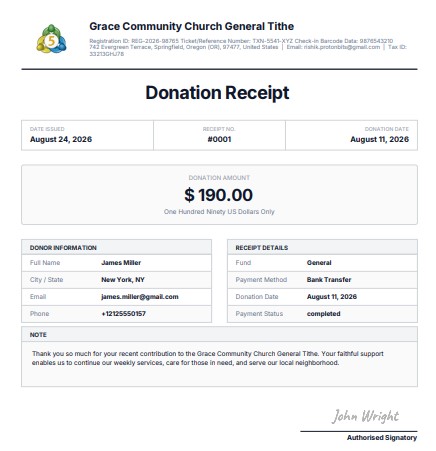
Use this example to review both readability and appearance. Can the donor identify the issuing organization, understand which donation the receipt relates to, and find the receipt reference easily?
If your organization is evaluating Tax Donation Receipt Software, also review the example against the requirements that apply to your donations. A sample demonstrates the layout; it should not be presented as a universal receipt template for all five countries.
Register Now and Try DonorKite for Free to explore the receipt workflow and review how your organization’s details appear.
Prepare Donor Statements Without Rebuilding Giving History
A donor may need information covering several contributions rather than one individual gift.
DonorKite supports annual and custom-period donor statements, helping your team prepare a consolidated view from recorded donation information.
This is another reason to keep donor records consistent. If one person’s contributions are split across duplicate profiles, the resulting statement may require additional checking.
Donor Management Software helps establish the correct donor history, while Donation Tracking Software helps your team review the contributions recorded during the selected period.
Statements also support internal checking. Staff can compare the requested period with the underlying donation records before providing the document.
A statement and an individual tax receipt may serve different purposes. Use the appropriate document for the donor’s request and the applicable requirements.
Support Organizations Across Five Countries
CRM for Nonprofit Organizations should address the language and administrative needs of the people using it.
DonorKite’s connected donor, donation, and receipt workflows are relevant to organizations in the United States, Canada, the United Kingdom, Australia, and New Zealand. The core administrative tasks are similar, while receipt requirements and tax treatment vary.
United States: Nonprofits, Churches, and Foundations
For US organizations, a CRM for nonprofits can help maintain donor histories, record contributions toward different funds, and prepare donor acknowledgments.
Donation records should make it easier to identify the donor, amount, and relevant supporting information. Where required, acknowledgment wording must also address whether goods or services were provided in return.
US teams evaluating Tax Donation Receipt Software should review the receipt setup alongside their organization’s acknowledgment requirements rather than assuming a standard document covers every contribution.
Canada: Charities and Non-Profit Organizations
Canadian charities and non-profit organizations benefit from accessible donor details, organized contribution histories, and consistent receipt administration.
CRM software for nonprofits can help teams maintain the information needed for their workflow. Organizations issuing official donation receipts should separately confirm their eligibility and the applicable CRA requirements.
Being a non-profit organization does not, by itself, mean every donation it receives qualifies for an official tax receipt.
United Kingdom: Charities and Community Organizations
For UK charities, a not for profit CRM can bring donor records, donation details, and receipt activity into a more manageable process.
Where Gift Aid applies, a donation receipt does not replace the required declaration. Organizations need to maintain the appropriate declarations and supporting information alongside their donation administration.
DonorKite’s donor and donation records can support organized day-to-day work without confusing receipt generation with automatic Gift Aid qualification or claim submission.
Australia: Charities and Not-for-Profits
Australian charities and not-for-profits can use a not for profit CRM to maintain supporter information, track recorded contributions, and manage receipt administration.
DonorKite’s Australian receipt workflow uses email-only receipts, supporting digital delivery to donors.
Organizations should confirm the relevant eligibility and receipt requirements before describing a contribution as tax-deductible. Donation Management Software helps organize the record; it does not establish the organization’s tax status.
New Zealand: Charities and Donee Organisations
New Zealand charities, not-for-profits, and donee organisations need reliable information connecting supporters with their contributions.
Donation Tracking Software helps staff review giving history and locate the records associated with a receipt or statement request.
Organizations preparing receipts for donation tax-credit purposes should confirm their eligibility and the relevant IRD requirements. Accurate records make the administrative work easier while preserving the distinction between recording a contribution and determining its tax treatment.
Bring Everyday Donation Administration into One Platform
Disconnected systems create repeated work. A donor’s address changes, but only one spreadsheet gets updated. A contribution is recorded, but the receipt is prepared using an older version of the donor’s details.
Nonprofit CRM Software is more useful when related tasks share the same underlying information.
With DonorKite, the workflow connects:
Adding or locating the donor.
Recording the contribution.
Selecting the relevant fund and payment method.
Assigning the receipt number.
Generating and emailing the receipt.
Reviewing donation and delivery activity.
Preparing statements when needed.
Donation Tracking Software helps your team follow the record through this process. Staff can work with the donation’s context instead of maintaining separate explanations in multiple places.
For organizations assessing a not for profit CRM, this is a practical benefit to prioritize: fewer handoffs between donor administration, donation recording, and receipt preparation.
Your organization still needs clear responsibilities and accurate data entry. A connected platform gives those working practices a consistent place to happen.
Move from Spreadsheets with a Manageable Starting Plan
Changing systems becomes easier when the first steps are clear.
Start by reviewing your existing donor information. Identify duplicate profiles, inconsistent contact details, and records that need clarification before import.
Then agree on the funds, payment-method labels, and receipt settings your team will use. Establishing these conventions early reduces avoidable corrections later.
When evaluating CRM software for nonprofits, work through a representative example:
Import a small, reviewed donor list.
Check that contact details appear correctly.
Record a sample donation.
Select its fund and payment method.
Review the receipt number and generated document.
Test email delivery using an address your team controls.
Review the donation history and statement workflow.
Donor Management Software should make your information easier to maintain after migration. The goal is a usable database and a repeatable routine that staff can continue following.
Avoid judging the move only by how quickly data uploads. Check whether your team can retrieve and use that information when a realistic donor request arrives.
Test the Features That Matter Before You Choose
The Best Nonprofit CRM Software should demonstrate its value through the tasks your organization performs most often.
During your DonorKite trial, focus on a few practical questions.
Can a staff member find an existing donor without creating a duplicate? Can they record a contribution with the right fund and payment method? Can they review the receipt, email it, and locate the associated activity afterward?
Also check the details that become important later: donor exports, duplicate merging, receipt customization, custom numbering, and statements for a selected period.
CRM software for nonprofits should support both the first donation you enter and the records you need to retrieve months later.
Bring the people who handle these tasks into the evaluation. An administrator may focus on entry speed, while the person answering donor enquiries may care more about receipt history and statement access.
A realistic trial gives you a clearer basis for choosing the Best Nonprofit CRM Software for your team.
Start Managing Donors, Donations, and Receipts with DonorKite
The right CRM for Nonprofit Organizations helps turn scattered records into a process your team can follow confidently.
DonorKite combines donor information, offline donation records, receipt numbering, customizable PDF receipts, email delivery, activity tracking, and donor statements in one platform.
For nonprofits, charities, churches, foundations, and other donation-receiving organizations, that means a more connected way to manage the work behind every contribution.
If you are comparing Nonprofit CRM Software, start with your everyday needs: accurate donor details, accessible donation history, consistent receipts, and straightforward follow-up.
DonorKite gives your organization a practical way to explore those tasks together.
Register Now and Try DonorKite for Free to see how your team can manage donors, track donations, and simplify receipts.