

Small nonprofits searching for Bloomerang alternatives in 2026 are usually looking for more than another name to add to a software comparison list. They need a donor management system that fits the way their organization actually records donors, manages offline donations, creates tax-related donation receipts, maintains giving histories and prepares donor statements.
Bloomerang is a well-established nonprofit CRM with a broad range of donor engagement, fundraising and supporter-management capabilities. However, organizations comparing a Bloomerang alternative do not necessarily need another platform with exactly the same scope.
For nonprofits whose priority is keeping donor records organized, recording donations received through existing payment methods, creating professional donation receipts, managing funds and payment methods, maintaining donor histories and producing statements and reports, DonorKite offers a more focused approach.
DonorKite is donor and donation management software designed around the administrative work that happens after a contribution is received. An organization can maintain the donor, record the donation, assign the appropriate fund, select the payment method, generate the relevant receipt, email it to the donor and keep that contribution within the donor's complete giving history.
The platform is particularly relevant to small nonprofits, charities, churches, foundations, trusts, community organizations and educational organizations in the United States, Canada, United Kingdom, Australia and New Zealand.
DonorKite also supports country-specific donation receipt workflows, allowing organizations to manage the donor, donation and tax-related information relevant to their location rather than relying on one generic receipt format.
Organizations can currently try DonorKite for free before deciding whether the workflow is right for their team.
DonorKite as a Bloomerang Alternative for Small Nonprofits
The most useful way to compare DonorKite with Bloomerang is not to count features.
Instead, look at the work your organization needs to complete every day.
A small nonprofit may need to know:
Who made this contribution?
How much did they donate?
When was the donation received?
Which fund did they support?
How was the donation received?
What tax-related information needs to be maintained?
Has a receipt been generated?
Was the receipt emailed?
What else has this donor contributed?
Can we create a year-end statement?
Can we find all of this information again without checking several spreadsheets?
DonorKite brings these activities into one connected workflow:
Donor → Donation → Fund → Payment Method → Tax Information → Receipt → Email Delivery → Giving History → Statement → Reporting
This focused approach makes DonorKite particularly relevant as donor management software for small nonprofits that want to improve day-to-day donation administration without introducing unnecessary complexity.
It also means DonorKite should not simply be viewed as a contact database.
The donor profile becomes the starting point for a much broader history covering donations, funds, payment methods, receipts and statements.
Everything DonorKite Helps you Manage after a Donation is Received
Consider a nonprofit that receives a $500 bank transfer from an existing supporter.
Receiving the money is only the first step.
An administrator still needs to identify the donor, record the $500 contribution, select the appropriate fund, record bank transfer as the payment method, confirm any relevant tax details and save the donation correctly.
A receipt may then need to be generated and emailed.
Later, that $500 should appear in the donor's complete giving history.
At year end, it may need to be included in the donor's contribution statement.
The organization may also need to include the contribution in reports.
Without a connected donor management system, these responsibilities can easily become separate tasks performed in separate spreadsheets, document templates, email inboxes and folders.
DonorKite is designed to keep those records connected from the beginning.
This is one of the main differences between simply storing transactions and having a structured donation management system.
Manage your Complete Donor Database in One Place
A dependable donor database is the foundation of donation administration.
If donor information is incomplete, duplicated or spread across several files, every process that depends on that information becomes harder.
Donation receipts may contain outdated details. Giving histories can become incomplete. Statements may miss contributions. Staff may struggle to determine which donor profile is correct.
DonorKite gives organizations one structured place to maintain donor information and the records connected with each donor.
Maintain Detailed Donor Profiles
A donor profile can contain important identifying and contact information required by the organization, including names, addresses, email details, phone information and country-related information.
Organizations can also maintain relevant tax-identification information.
Because tax terminology differs internationally, DonorKite allows tax-related labels to be adapted according to the organization's requirements rather than forcing every organization to use exactly the same terminology.
This becomes particularly useful when the software is used across different countries.
A U.S. nonprofit may need to maintain an EIN-related workflow, while a Canadian registered charity may work with different identification requirements. Australian and New Zealand organizations use different tax terminology again.
The important point is that donor information stays connected with the donor rather than being repeatedly entered whenever another contribution is received.
For organizations trying to improve the quality of their records, DonorKite's donor database software approach helps bring donor profiles, offline donations, histories and receipts into one place.
Keep the Complete Donor Giving History Together
A donor should not become a new spreadsheet row every time they contribute.
If someone makes four donations during the year, all four contributions should build into that person's history.
This allows authorized users to see much more than a contact record.
They can understand how the donor has supported the organization over time.
For example, staff may be able to review:
Previous donation dates
Contribution amounts
Funds supported
Payment methods
Previous receipt records
Annual giving activity
This makes donor management much more useful when someone contacts the organization with a question about an earlier contribution.
Instead of checking several files, staff can start with the donor.
Reduce Duplicate and Inconsistent Donor Records
Duplicate donor profiles are one of the most common problems in spreadsheet-based donor management.
For example, one administrator may create a profile for "Michael Anderson."
Later, another person enters "Mike Anderson."
If those records represent the same person, the donor's history is now divided.
The organization may see three donations on one profile and two donations on another, even though the donor actually contributed five times.
This creates problems when preparing receipts, statements and reports.
Maintaining one centralized donor database makes duplicate donor management easier and gives the organization a more reliable source of information.
For a deeper look at maintaining cleaner records, organizations can review DonorKite's donor data management guidance.
Move Existing Donor Records From Excel into DonorKite
Many small nonprofits begin with Excel.
There is nothing unusual about that.
A spreadsheet can work well when an organization has a small number of donors and only occasional contributions.
The difficulty begins as that spreadsheet becomes several spreadsheets.
One file contains donors.
Another contains donations.
Another contains a particular year's contributions.
Another tracks funds.
Receipt PDFs are stored in folders.
Important communication remains in individual email accounts.
At that stage, adding more spreadsheet tabs does not necessarily solve the problem.
DonorKite supports importing and exporting data, giving organizations a way to move existing donor information into a more structured database.
Migration should also be used as an opportunity to review the quality of existing information.
Before moving donor records, organizations should consider cleaning duplicate names, outdated contact information, inconsistent phone formats, incomplete addresses and fragmented donor histories.
The aim should not simply be to transfer an old spreadsheet into new software.
It should be to create a dependable donor database for future administration.
Record and Track Offline Donations
Offline donation management is one of DonorKite's core use cases.
An organization can continue receiving donations through the methods it already uses and record those contributions in DonorKite afterwards.
DonorKite is not positioned as the payment gateway through which every contribution must be processed.
Instead, its role is to organize the donation after the organization has received it.
Record Cash, Check, Cheque and Bank Transfer Donations
Different organizations and countries use different payment methods.
DonorKite can help staff maintain contributions received through methods such as:
Cash
Check
Cheque
Bank transfer
Other configured payment methods used by the organization
A structured donation record can include the donor, amount, date, fund, payment method and relevant remarks.
This means the nonprofit does not simply know that $500 was received.
It knows who contributed the $500, when it was received, which fund it supported and how it arrived.
That additional context becomes valuable for historical records and reporting.
Keep Every Donation Connected to the Correct Donor
Every recorded contribution becomes part of the donor's giving history.
Imagine a supporter gives:
$100 in January
$250 in April
$150 in August
$500 in December
If these contributions are maintained in different files, the organization has four separate transactions to find later.
If they are connected with one donor profile, the organization has a complete giving history.
That history can later support receipt administration, donor enquiries, year-end statements and reporting.
This is an important distinction when evaluating donation tracking software.
The objective is not simply to record transactions.
The objective is to maintain the relationship between the donor and those transactions.
Correct and Manage Donation Records When Needed
Real-world donation administration is not perfect.
A staff member may enter the wrong amount.
A donation may accidentally be recorded twice.
The wrong fund may be selected.
A contribution may need to be corrected.
DonorKite gives authorized users the ability to manage donation records when changes are required.
Similar records can also be duplicated when that helps reduce repeated data entry.
Where an incorrect donation needs to be removed from active records, the system can manage that record so it does not incorrectly contribute to current totals.
This creates a more controlled approach than manually deleting spreadsheet rows without a consistent administrative process.
Organize Donations by Funds
Many nonprofits receive contributions for more than one purpose.
A community organization may have a general fund and several program-specific funds.
A church may manage a general offering fund, building fund and mission fund.
A foundation may maintain scholarship and community support funds.
DonorKite allows the organization to create the funds it actually needs and associate individual contributions with those funds.
Examples could include:
General Fund
Education Fund
Scholarship Fund
Community Program Fund
Building Fund
Emergency Relief Fund
Mission Fund
This improves recordkeeping because the purpose of a donation is captured when the contribution is recorded.
Staff do not have to reconstruct the allocation months later from notes or separate spreadsheets.
Fund information can also support more meaningful donation reporting.
Configure Payment Methods Around Your Organization
Organizations do not all receive contributions in exactly the same way.
That is why DonorKite allows payment methods to be configured according to the organization's actual processes.
For one nonprofit, common methods may be cash and check.
For another, cheque and bank transfer may represent most contributions.
Keeping the payment method attached to each donation improves the quality of the historical record.
It can also make internal reconciliation easier because staff can identify how contributions were received without searching external records.
Create Donation Receipts Directly From Donation Records
Donation receipt administration is one of the strongest reasons to connect donor and donation records.
Without dedicated donation receipt software, organizations often repeat the same work several times.
A donation is entered in a spreadsheet.
Someone opens a receipt template.
The donor name is typed again.
The contribution amount is typed again.
The date is entered again.
The receipt is converted to PDF.
Someone opens an email account.
The receipt is attached.
Then the organization needs another way to remember which receipt was sent.
DonorKite simplifies this by generating the receipt from the donation information that has already been recorded.
Organizations looking to improve this process can review DonorKite's guidance on donation receipts for nonprofits.
Generate Professional PDF Donation Receipts
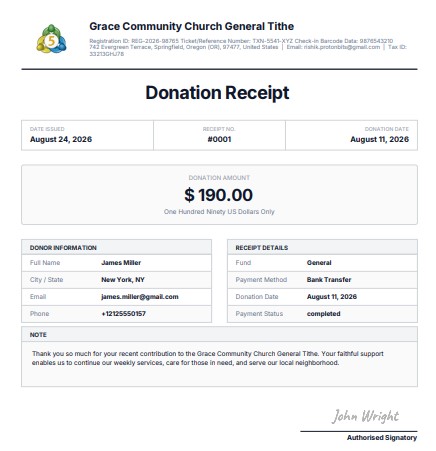
The workflow is straightforward:
Donor → Donation → Receipt
Because the donor and contribution information already exists, the organization does not need to rebuild the same receipt information manually for every contribution.
A PDF receipt can be generated from the recorded donation and remain associated with the appropriate donor and contribution.
This makes historical receipt retrieval much easier as well.
If a donor asks for another copy months later, staff can begin with the donation record instead of searching through unrelated PDF folders.
Keep Receipt Numbers Organized
Receipt numbering is important for reliable donation receipt administration.
DonorKite supports structured receipt numbering so organizations do not need to manually invent a number every time a receipt is generated.
Organizations can also manage receipt numbering around their financial-year requirements and configure the starting number where needed.
For example, an organization moving from another receipt process may already have issued receipts #00001 through #00019.
Instead of restarting at #00001, the organization can configure its next receipt sequence appropriately.
This helps maintain continuity in internal records.
Customize Donation Receipts Around your Organization
A professional donation receipt should reflect the organization that issued it.
DonorKite includes receipt customization capabilities so nonprofits and charities are not restricted to one completely generic layout.
Organizations can configure receipt elements such as:
Organization logo
Authorized signature
Organization information
Receipt labels
Fonts
Tax-related fields
Country-specific terminology
Receipt wording and other available settings
This can be particularly useful for organizations moving away from manually maintained Word or PDF templates.
Instead of repeatedly editing documents, receipt preferences can form part of a consistent donation-management workflow.
Support Country-Specific Tax Donation Receipt Workflows
Donation receipt requirements are not identical around the world.
The United States, Canada, United Kingdom, Australia and New Zealand use different tax terminology, documentation rules and charitable contribution frameworks.
A U.S. charitable contribution acknowledgement should not be treated as identical to a Canadian official donation receipt.
Gift Aid administration in the UK is different again.
Australian organizations may need to consider DGR and ATO requirements, while New Zealand organizations work with IRD donation receipt rules.
DonorKite helps organizations maintain the donor, donation and receipt information needed to support these country-specific processes.
Organizations managing receipts across different jurisdictions can review DonorKite's Charitable Contributions Receipt Requirements resource for a detailed country-by-country overview.
Software can support a structured receipt workflow, but the organization remains responsible for ensuring the contribution qualifies for the treatment being applied and that its documentation satisfies the requirements relevant to its circumstances.
United States: IRS Donation Receipts and Charitable Contribution Records
For nonprofits in the United States, charitable contribution documentation is closely connected with IRS requirements.
A 501(c)(3) organization may need to maintain details such as:
Organization information
Donor information
Contribution date
Monetary contribution amount
Description of eligible non-cash contributions
Appropriate statements relating to goods or services where applicable
The documentation required can depend on the amount and nature of the contribution.
For example, a single contribution of $250 or more generally creates an important written acknowledgement requirement for the donor, while non-cash donations require different treatment from ordinary monetary contributions.
Maintaining the original donor and donation record accurately makes generating appropriate documentation much easier.
U.S. organizations can review DonorKite's IRS donation receipt requirements for detailed information about charitable contribution acknowledgements and common receipt requirements.
DonorKite helps keep the donor, contribution, receipt number and historical record connected so staff do not need to reconstruct documentation each time it is required.
Canada: CRA Official Donation Receipt Management
Canadian registered charities operate under a more prescriptive official donation receipt framework.
A CRA official donation receipt may need information such as the charity's legal information, registration number, donor name and address, unique receipt number, donation date, issue date, amount of the gift and eligible amount where an advantage is involved.
Because multiple fields may be required, accurate underlying donor records are particularly important.
If a donor's address exists in one spreadsheet and their donation history exists somewhere else, receipt administration becomes unnecessarily complicated.
A centralized system gives staff a more reliable starting point.
Canadian organizations can review DonorKite's CRA donation receipt software information for a deeper look at official receipts, historical records and structured receipting.
DonorKite can help Canadian charities maintain donor information, record offline donations, generate applicable receipts and send those receipts to donors through email.
United Kingdom: Gift Aid Records and Donor Giving History
UK charities work within a different charitable tax framework.
Gift Aid is particularly important because it relies on appropriate donor declarations and records connected with qualifying donations.
A Gift Aid declaration should not simply be treated as another name for a U.S. or Canadian donation receipt.
These are different processes.
However, they share one important requirement: good donor data.
A charity needs to know who the donor is and which contributions belong to that donor.
If one supporter exists under several duplicate profiles, reviewing the giving history connected with Gift Aid can become more difficult.
DonorKite provides the underlying donor and donation-management structure needed to keep supporter information and contribution histories organized.
UK organizations can review DonorKite's charity CRM software for UK charities resource for more information about donor records, donation management and Gift Aid-related administration.
DonorKite does not replace the charity's responsibility to maintain the appropriate declarations or complete its Gift Aid claims correctly. Its role is to provide cleaner underlying donor and donation records that support those administrative processes.
Australia: ATO and DGR Donation Receipt Records
Australian charities need to consider whether the recipient organization or relevant fund has Deductible Gift Recipient status and whether a particular contribution qualifies for the relevant treatment.
This means not every acknowledgement should automatically be treated as a tax-deductible receipt.
Where an appropriate donation receipt is issued, accurate organization, donor and contribution details are important.
DonorKite helps maintain those underlying records and allows receipts to be created from recorded donation information.
Australian organizations looking at this workflow can review DonorKite's ATO donation receipt software information.
For Australian organizations, DonorKite can support a practical workflow:
Record donation → confirm relevant information → generate receipt → send receipt by email → keep the donation and receipt history together.
The organization remains responsible for determining whether the contribution qualifies for the relevant tax treatment.
New Zealand: IRD Donation Receipt Records
New Zealand organizations have their own donation receipt and donation tax credit framework.
Eligible donors may use appropriate donation receipts when claiming donation tax credits, which makes accurate documentation important.
Relevant records may include:
Organization details
IRD-related information
Donation date
Donation amount
Donor information
Receipt or reference number
Confirmation relevant to the nature of the gift
Organizations can review DonorKite's IRD donation receipt requirements for more information about documentation for New Zealand charities and donee organizations.
Once again, DonorKite's role is to organize the records and receipt workflow rather than decide whether every contribution automatically qualifies for a tax credit.
Send Donation Receipts Directly by Email
Generating the receipt is only half of the administrative process.
The organization still needs to deliver it to the donor.
DonorKite supports email receipt delivery as part of its standard donation workflow.
Once the relevant donation has been recorded and the receipt prepared, the organization can email the donation receipt to the donor.
This removes several manual steps.
Instead of creating the receipt in one system, downloading it, opening another application, finding the donor's email address and manually tracking whether the document was sent, staff can keep the process connected with the donation record.
For small teams, reducing these repetitive steps can make a noticeable difference during busy periods.
Maintain Receipt History and Delivery Records
A donor may contact the organization months after a contribution was made.
They may have lost the original receipt.
They may want another copy.
The organization may need to confirm whether documentation was issued.
This is why receipt history matters.
DonorKite keeps receipt information connected with the relevant donation, making previous records easier to locate and manage.
Email delivery information and receipt history also provide administrators with a clearer view of what has happened with the documentation rather than forcing them to rely on memory or search through individual inboxes.
Generate Annual and Custom Donor Statements
Donation receipts and donor statements solve different problems.
A receipt relates to an individual donation.
A donor statement brings multiple contributions together over a defined period.
This is particularly valuable for regular supporters.
Imagine a donor contributes every month.
By the end of the year, the organization may have twelve contributions associated with that person.
If those donations were recorded consistently within one donor profile, the giving history already exists.
There is no need to rebuild the donor's annual record from several spreadsheets.
Create Annual Donor Statements
DonorKite supports donation statements, helping organizations prepare consolidated records of donor contributions.
This can simplify year-end administration, particularly when many donors request summaries at the same time.
Instead of manually identifying every contribution associated with one supporter, the organization can work from the donor's maintained history.
Generate Statements for Custom Periods
Organizations may also need contribution information for periods other than a complete year.
A supporter may request a statement covering six months.
An organization may operate according to a specific financial year.
Another donor may need documentation covering a custom period.
DonorKite allows organizations to work from the donor's existing history when generating appropriate statements rather than recreating the information manually.
Get Useful Donation Reports Without Rebuilding Excel Files
Reporting becomes much easier when the underlying records are consistent.
If every donation contains the donor, amount, fund and payment method, the organization already has structured information that can be used for reporting.
DonorKite includes donation reporting so authorized users can review recorded activity without maintaining another independent reporting spreadsheet.
Organizations may need to examine:
Donation activity for a particular period
Donations associated with specific funds
Payment-method records
Individual donor histories
Overall donation totals
Other recorded donation information
This allows information entered during normal daily administration to remain useful later.
The organization records the donation once and can then use that structured data across receipts, histories, statements and reports.
Customize DonorKite Around your Organization's Requirements
One of the realities of nonprofit administration is that two organizations rarely work in exactly the same way.
One charity may require a specific receipt layout.
Another may use unique terminology for its funds.
A church may organize contributions differently from a foundation.
A Canadian charity may have record requirements that differ from those of an Australian organization.
DonorKite already provides configurable elements across donor records, funds, payment methods, receipt settings and organization information.
But an organization may occasionally require something more specific.
If your nonprofit has a unique workflow or customization requirement, you can contact the DonorKite team and explain exactly what you need.
This may include requirements around:
Organization-specific workflows
Receipt formats
Custom terminology
Record fields
Fund structures
Reporting requirements
Other donation-management processes
The correct approach is not to assume that every requested feature will automatically be available.
Instead, contact DonorKite to discuss the requirement and determine what can be configured or customized for your organization.
If your organization has a specific requirement, contact DonorKite to discuss how the platform can fit your donation-management workflow.
What a Typical DonorKite Workflow Looks Like
A practical example makes the overall DonorKite workflow easier to understand.
Suppose a community charity receives a $300 bank transfer from an existing donor.
First, an authorized administrator searches for the donor.
The existing donor profile is selected instead of creating another version of the same person.
The administrator reviews the donor information and updates anything that has changed.
Next, the $300 donation is entered.
The appropriate fund is selected.
Bank transfer is chosen as the payment method.
Relevant donation information is added.
The donation is saved.
Because it has been recorded against the existing donor, the $300 immediately becomes part of that donor's giving history.
Where an appropriate donation receipt is required, the administrator generates it using the recorded donor and contribution information.
The receipt is sent to the donor by email.
The donation and receipt remain available within the organization's records.
If the same person donates again several months later, that contribution is added to the same donor history.
At year end, those contributions can support a donor statement.
The same records can also be included in donation reports.
That is the main value of a connected workflow.
The organization does not have to create separate donor, donation, receipt and statement records from scratch at each stage.
DonorKite vs Bloomerang: A Practical Comparison
DonorKite and Bloomerang both deal with donor information, but they have different scopes.
Bloomerang is positioned as a broader nonprofit CRM and giving platform with donor engagement, fundraising, supporter intelligence and related capabilities.
DonorKite is more focused on donor records, offline donation administration, tax-related receipts, statements, funds and donation reporting.
Comparison Area | DonorKite | Bloomerang |
Core focus | Donor and offline donation administration | Broader nonprofit CRM and giving platform |
Donor database | Yes | Yes |
Donor giving history | Yes | Yes |
Offline donation management | Core workflow | Supported within broader CRM |
Funds/campaigns | Yes | Yes within broader platform capabilities |
Payment-method records | Configurable | Broader transaction-management capabilities |
Donation receipt generation | Core workflow | Available within broader platform |
Receipt customization | Yes | Varies by product/setup |
Country-specific receipt workflow | DonorKite focus | Requirements should be checked for the organization's setup |
Email receipt delivery | Yes | Available capabilities depend on setup |
Donor statements | Yes | Reporting and donor-record capabilities available |
Data import | Yes | Yes |
Donation reports | Yes | Broader reporting and analytics |
Custom requirements | Contact DonorKite to discuss | Depends on Bloomerang package and platform capabilities |
Current starting price | $49/month | $242/month, billed annually |
Best suited for | Organizations focused on donors, offline donations, receipts and statements | Organizations seeking a broader nonprofit CRM ecosystem |
Neither platform needs to be universally better.
The appropriate choice depends on the organization's requirements.
A nonprofit looking for a broader CRM ecosystem with extensive supporter engagement and fundraising functionality may prefer that wider scope.
A small nonprofit primarily trying to organize donors, offline contributions, tax receipts, funds, giving histories, statements and reports may prefer the narrower operational focus offered by DonorKite.
That is why DonorKite is worth considering when researching Bloomerang alternatives.
Who is DonorKite Best Suited For?
DonorKite can be particularly useful for organizations where donor and donation administration is the main requirement.
Potential users include:
Small nonprofits
Registered charities
Churches and faith-based organizations
Foundations
Trusts
Community organizations
Associations
Educational organizations
Small administrative teams
It can be especially relevant when an organization is moving away from spreadsheets, receives a meaningful number of offline contributions, issues donation receipts regularly or needs a clearer donor giving history.
Organizations that operate in the United States, Canada, United Kingdom, Australia and New Zealand can also benefit from configuring receipt information around the terminology and requirements relevant to their location.
Try DonorKite Before Making a Decision
Changing donor management software should not depend only on reading a feature list.
The best way to understand whether the workflow fits your organization is to use it.
DonorKite currently offers a 7-day free trial.
During the trial, organizations can test everyday activities such as:
Adding donor records
Recording sample donations
Creating funds
Configuring payment methods
Reviewing donor histories
Customizing receipts
Generating receipt PDFs
Sending receipts through email
Reviewing statements
Exploring donation reports
This gives staff an opportunity to evaluate the platform around the tasks they actually perform.
Try DonorKite for free and see whether the workflow fits your nonprofit before subscribing.
DonorKite Pricing for Small Nonprofits
DonorKite currently offers a straightforward monthly plan priced at $49 per month.
The current plan includes:
Unlimited donors and donations
Donor management
Email donation receipts
One-click donation statements
Funds and campaigns
Donation reports
Cloud-based access
Email support
This straightforward structure makes it easier for a small organization to understand the basic cost of adopting the software without comparing several complicated product tiers.
Organizations with specific customization requirements should contact DonorKite directly because additional requirements may need to be discussed separately.
Why DonorKite is Worth Considering as a Bloomerang Alternative
DonorKite's value becomes clearer when all of its core workflows are viewed together.
Organizations can maintain one donor database instead of scattered spreadsheets.
They can preserve complete donor giving histories.
Existing donor information can be imported rather than recreated manually.
Duplicate donor records can be reduced and managed more consistently.
Cash, checks, cheques, bank transfers and configured payment methods can be recorded in one system.
Contributions can be assigned to appropriate funds.
Donation records remain connected to the donor who made them.
Tax-related donor information can be maintained.
Donation receipts can be generated from recorded contribution details.
Receipt numbering can be kept structured.
Receipts can use the organization's logo, signature, fonts, labels and terminology.
Country-specific tax receipt workflows can be supported for organizations in the United States, Canada, United Kingdom, Australia and New Zealand.
Receipts can be sent directly by email.
Historical receipt information remains easier to find.
Annual and custom-period donor statements can be produced from maintained giving histories.
Donation reports can use the same data entered during everyday administration.
And if the organization's requirements do not fit the standard setup exactly, it can speak with DonorKite about possible customization.
This creates a focused system around the administrative work small nonprofit teams perform repeatedly.
Is DonorKite the Right Bloomerang Alternative for your Small Nonprofit?
The right Bloomerang alternative depends on what your organization actually wants to improve.
If you are looking for a broad nonprofit CRM environment that combines donor engagement, fundraising and a large range of related capabilities, your evaluation should focus on platforms designed around that type of ecosystem.
But if your everyday challenges involve maintaining donor records, tracking offline contributions, organizing funds, creating tax-related donation receipts, emailing receipts, reviewing donor histories, preparing statements and producing reports, DonorKite deserves serious consideration.
Its value is in connecting those responsibilities.
The donor does not live in one spreadsheet while the donation lives in another.
The receipt does not need to exist as an unrelated PDF.
The donor statement does not need to be reconstructed manually at year end.
The same structured records can support the complete administrative workflow.
Organizations can start a free DonorKite trial and test these workflows using their own donor-management requirements.
Have a specific workflow or feature requirement that is not part of your standard setup? Contact DonorKite and discuss what your organization needs.
Frequently asked questions
Is DonorKite a good Bloomerang alternative for small nonprofits?
DonorKite is worth considering for small nonprofits whose primary requirements include donor management, offline donation tracking, donation receipts, donor giving histories, funds, payment methods, statements and donation reports. Bloomerang has a broader CRM and fundraising scope, while DonorKite focuses more directly on donation administration.
What does DonorKite help nonprofits manage?
DonorKite helps organizations manage donor profiles, offline donations, donation histories, funds, payment methods, donation receipts, email receipt delivery, donor statements and donation reports.
Can DonorKite manage offline donations?
Yes. DonorKite is designed to help organizations record donations they have already received through existing methods such as cash, checks or cheques, bank transfers and other configured payment methods.
Does DonorKite generate donation receipts?
Yes. Donation receipts can be generated from recorded donor and contribution information, reducing the need to recreate the same details manually in separate document templates.
Can DonorKite create tax-related donation receipts?
DonorKite supports country-specific receipt formats and tax-related receipt workflows. Organizations remain responsible for ensuring that a particular contribution qualifies for the treatment being applied and that their documentation meets relevant regulatory requirements.
Which countries are covered by DonorKite's receipt workflows?
For the markets discussed in this article, DonorKite can support organizations managing receipt information for the United States, Canada, United Kingdom, Australia and New Zealand, including terminology associated with IRS, CRA, Gift Aid/HMRC, ATO/DGR and IRD requirements.
Can DonorKite customize donation receipts?
Yes. Organizations can configure receipt-related elements such as their logo, authorized signature, organization information, labels, fonts, tax-related information and relevant terminology.
Does DonorKite send receipts through email?
Yes. Email donation receipt delivery is part of DonorKite's current donation-management workflow.
Can DonorKite generate donor statements?
Yes. DonorKite includes donation statements that help organizations work from a donor's maintained giving history when creating annual or custom-period contribution records.
Can DonorKite be customized for my organization?
If your organization has a specific workflow, receipt format, terminology, reporting requirement or other donation-management need, contact DonorKite to discuss the requirement. The team can determine what can be configured or customized for your organization.
How much does DonorKite cost?
DonorKite currently lists its standard plan at $49 per month, including unlimited donors and donations, donor management, email donation receipts, donation statements, funds and campaigns, donation reports, cloud access and email support.
Does DonorKite have a free trial?
Yes. DonorKite currently offers a 7-day free trial, allowing organizations to test the donor, donation, receipt, statement and reporting workflows before subscribing.