
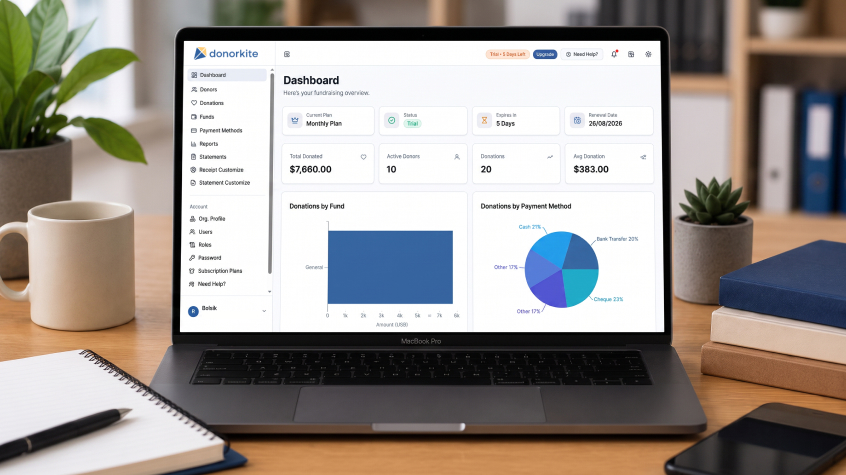
Choosing the best nonprofit software in 2026 is not about finding the platform with the longest feature list. It is about finding software that solves the administrative problems your organization handles every day without adding unnecessary cost, complexity or manual work.
For many small nonprofits, those problems are practical. Donor information is spread across spreadsheets. Donations are recorded separately from donor profiles. Staff have difficulty tracking repeat contributions. Funds and payment methods are entered inconsistently. Donation receipts require manual work, and checking a donor’s complete giving history means searching through several files.
That is where the right nonprofit software can make a measurable difference.
Some organizations need a broad CRM for nonprofits. Others need grant management or membership software. But when the main challenge is managing donors, recording contributions, tracking donations, creating receipts and keeping giving history organized, dedicated donor management software or donation management software may provide a much better fit than a large all-purpose system.
The best nonprofit software for a small organization should therefore be chosen around the work your team actually needs to simplify.
This guide focuses on the buying criteria that matter when comparing nonprofit CRMs, donor management systems, donation tracker software, donor database software and donation management platforms in 2026.
If donor records, donation tracking and receipts are already creating more work than they should, you can also register for DonorKite and see how a focused donor and donation management workflow works for your organization.
What Should Small Organizations Look for in Nonprofit Software?
The nonprofit software market covers several very different product categories.
Search results may show CRM software for nonprofits, nonprofit CRMs, donor management software, donation management software, donor database systems, fundraising software, grant management platforms, membership management software and accounting applications.
These systems are not interchangeable.
A grant-focused organization may genuinely need grant management software. A member-based association may need membership functionality. An organization maintaining complex relationships with volunteers, members, corporate partners, donors and other constituents may benefit from a broader CRM for nonprofit organizations.
But a small donor-supported organization may have a much more focused set of requirements.
If most of your administrative work involves donors and contributions, your buying priorities probably look more like this:
What your organization manages | What the software should help with |
Donors | Maintain complete, searchable donor records |
Donations | Record individual contributions accurately |
Donation tracking | Keep donations connected with donors and dates |
Giving history | Review previous contributions from one donor profile |
Funds | Categorize donations consistently |
Payment methods | Record how contributions were received |
Donation receipts | Generate receipts from recorded donation information |
Receipt customization | Configure organizational information and formatting |
Donor statements | Summarize giving over annual or custom periods |
Existing records | Import donor information from spreadsheets |
Reporting | Review donation information without rebuilding spreadsheets |
That distinction matters because the best nonprofit software is not necessarily an all-in-one enterprise system.
For a small organization, the better solution may be software that does a smaller number of essential jobs extremely well.
1. Decide Whether You Need a Nonprofit CRM or Donor Management Software
CRM for nonprofits is one of the biggest software categories in the sector.
A nonprofit CRM can be valuable when an organization needs broad constituent relationship management across donors, members, volunteers, prospects, partners and other contacts.
But not every organization needs that level of scope.
If your staff mainly needs to maintain donor records, record donations, track giving, manage funds, create receipts and prepare donor statements, a focused donor management system may be easier to implement and use.
This distinction becomes particularly important for small organizations.
A large cloud based CRM for nonprofits may provide hundreds of capabilities. That can be beneficial when those features support genuine organizational workflows. But additional functionality has limited value when staff rarely use it.
Before comparing nonprofit CRM platforms with donor management software, write down the tasks users will actually perform each week.
If the list looks like this:
adding or updating donors;
entering donations;
finding previous contributions;
checking donation history;
assigning funds;
recording payment methods;
generating receipts;
reviewing giving records; and
producing donor statements,
then dedicated nonprofit donor management software deserves serious consideration.
For a deeper comparison of the CRM category, see our Best CRM for Small Nonprofits guide.
The goal is not to avoid CRM software. It is to avoid paying for CRM complexity when the organization primarily needs reliable donor and donation management.
2. Make the Donor Database Your Reliable Source of Information
Good nonprofit software should reduce the number of places staff need to search for donor information.
Many small organizations begin with Excel. There may initially be one spreadsheet containing donor names, phone numbers, email addresses and donation amounts.
As the organization grows, that one file often becomes several.
A new spreadsheet is created for another year. Someone maintains receipt information separately. Donation totals are kept in another worksheet. Another staff member creates a separate list for donor contact information.
Eventually, nobody is completely certain which record is current.
A proper database for nonprofits should provide one structured location for donor information and the giving records connected with each supporter.
When comparing donor database software, evaluate whether staff can easily:
add donors;
update donor information;
search existing records;
avoid unnecessary duplicate profiles;
review giving history;
import existing donor data; and
export information when needed.
This is where nonprofit database management begins.
The objective is not simply to digitize a spreadsheet. It is to create a dependable source of information that staff can use throughout the donation-management process.
If your organization is specifically evaluating this requirement, our Donor Database Software guide explains how donor databases differ from spreadsheets and broader donor management systems.
3. Donation Management Software Should Connect Every Donation to the Right Donor
Donation management is one of the most important areas to evaluate when choosing the best nonprofit software.
Recording a donation as an isolated transaction is not enough.
Each contribution should remain connected with the donor who made it.
Imagine the same supporter gives $100 in January, $250 in April and $500 later in the year. If those transactions live in separate spreadsheets or disconnected records, staff may know that three donations were received but still struggle to understand the donor’s complete relationship with the organization.
Good donation management software solves this by connecting each contribution with the appropriate donor profile.
That allows staff to answer practical questions quickly:
How many times has this donor contributed?
When was the most recent donation?
What amounts have they given?
Which fund did they support?
What payment method was used?
Has the donation been receipted?
That connection between donor management and donation tracking is fundamental.
A generic database may be capable of storing names and amounts. Dedicated donation software should make the relationship between the person and each contribution much clearer.
Organizations still maintaining these records manually can also review why nonprofits are moving from spreadsheets to software for donation management.
4. Evaluate the Donation Tracker, Not Just the Dashboard
The quality of a donation tracker should be judged by how easily staff can record and retrieve contributions.
A visually impressive dashboard does not automatically make a system easy to use.
When testing nonprofit software, perform the workflow your organization will actually use.
Create or locate a donor.
Record a donation.
Add the contribution amount and date.
Choose the appropriate fund.
Choose the payment method.
Save the donation.
Then find the contribution again.
The process should feel straightforward.
Donation tracking is a repetitive administrative task. If entering a contribution takes too many steps, staff may eventually create shortcuts outside the system.
That defeats the purpose of buying software.
A good donation tracker should help an organization maintain consistent records while making everyday contribution entry faster and easier than a manual spreadsheet process.
This is particularly important for organizations receiving offline contributions through cash, checks, bank transfers or other existing methods. DonorKite is designed to record and organize those donations after they are received rather than functioning as an online payment gateway.
If donation tracking is one of your strongest buying requirements, read our Donation Tracker Software guide for a more focused look at the category.
5. Donation Tracking Should Build a Complete Giving History
Donation tracking should create more than a transaction list.
Over time, recorded contributions should build a useful donor history.
That distinction becomes increasingly important as repeat giving increases.
A donor who has supported the organization for several years should not look identical to someone making a first contribution simply because the information is stored in different files.
A useful donor management system should allow staff to move from the donor profile to the associated donation records without manually combining data.
This improves several everyday tasks.
Staff can respond more confidently when donors ask about previous contributions.
Giving history remains available when responsibility moves from one employee to another.
Repeat donations can be reviewed without searching several spreadsheets.
Annual giving information becomes easier to prepare.
The more consistent the donation tracking process is, the more useful the donor database becomes.
That is why donor management software and donation management software should not be evaluated as completely separate concepts. For many small organizations, the greatest value comes from having both donor information and donation history working together.
6. Look for Structured Funds Instead of Free-Text Categories
Not every contribution supports the same purpose.
A nonprofit may maintain a general fund along with several designated funds.
If fund information is entered manually every time, inconsistencies can develop quickly.
One staff member may enter “General Fund.”
Another enters “General.”
Someone else uses an abbreviation.
The organization now has multiple labels for what should be one category.
This creates unnecessary cleanup when reporting.
Good donation management software should allow the organization to maintain a structured fund list and select the correct fund while entering a donation.
DonorKite supports configurable funds so donations can be associated with the appropriate category consistently.
This is a relatively simple feature, but small improvements in data entry can have a large impact once hundreds or thousands of donation records accumulate.
The best nonprofit software should prevent avoidable data-quality problems instead of expecting staff to repair them later.
7. Payment Methods Should Be Consistent Too
The same principle applies to payment methods.
Organizations may receive contributions through cash, checks, bank transfers, direct deposits or other methods they already use.
Donation records should indicate how the contribution was received.
But allowing every staff member to type a payment method from scratch can create inconsistent information.
One person enters “Check.”
Another uses “Cheque.”
Another enters a bank name rather than the actual payment method.
Structured payment-method lists reduce that problem.
DonorKite allows organizations to maintain the payment methods they use and select the relevant option when recording a donation.
This improves donation tracking because the data stays consistent from one record to the next.
When comparing donation software, these practical workflow controls deserve attention. They may not sound as impressive as advanced dashboards, but they directly affect the reliability of everyday records.
8. Donation Receipts Should Come From Existing Donation Records
Recording the donation should not be the beginning of another manual process.
For many organizations, a contribution also requires a donation receipt.
In a spreadsheet workflow, staff may record the donation first, open a separate receipt template, re-enter the donor’s information, type the contribution details again and store the finished receipt somewhere else.
That creates duplicate work.
It also creates opportunities for the information on the receipt to differ from the underlying donation record.
Better nonprofit software connects these processes.
Once contribution information has already been recorded, the receipt should use that existing data instead of requiring staff to enter everything again.
DonorKite connects donation records with receipt generation so the administrative workflow can move from recording the contribution to maintaining the related receipt record more efficiently.
Organizations can also customize receipt elements such as their logo, signature, labels and fonts.
For organizations comparing dedicated receipt solutions, our Donation Receipt Software Buyer's Guide covers receipt-generation and receipt-management considerations in greater detail.
9. Check Receipt Numbering and Receipt History Before You Choose
Receipt numbering can become difficult to manage manually as donation volume increases.
If multiple staff members create receipts, relying on manually maintained documents or spreadsheets can make sequential numbering harder to control.
A donor management system should reduce that administrative burden.
DonorKite supports automatic receipt numbering based on the organization’s financial-year setup, helping maintain more consistent receipt records.
Historical access matters too.
Staff should be able to identify the receipt associated with a recorded donation rather than searching through separate folders.
This is another reason donation tracking, donor management and receipt management work better when they are part of a connected workflow.
When evaluating the best nonprofit software, consider everything that happens after the contribution is saved, not just the data-entry screen.
10. Look for Complete Donor Giving History
Giving history becomes increasingly valuable as the relationship with a supporter grows.
A donor profile should provide more than a phone number and email address.
Staff should be able to understand the donations associated with that donor and review previous contribution information without reconstructing it manually.
Reliable history helps answer questions such as:
When did this person last give?
How many contributions have been recorded?
What amounts were donated?
Which funds were supported?
Having this information available creates continuity within the organization.
The history no longer depends on one employee remembering where an old spreadsheet is stored.
It becomes part of the organization’s database.
Accurate donor history can also support stronger stewardship and retention because staff have a clearer picture of past giving. We explain this relationship further in How Donor Management Software Helps Nonprofits Increase Donor Retention.
11. Donor Statements Should Use the Giving History You Already Maintain
Individual receipts are important, but repeat donors may also need a consolidated giving statement.
Without suitable software, preparing those statements can become another manual process.
Suppose one supporter made twelve contributions during the year.
If those transactions are spread across monthly spreadsheets, someone may need to identify all twelve records, confirm the details and manually create a summary.
A system already maintaining accurate donation tracking should make that process much simpler.
DonorKite supports donor statements for annual periods as well as custom date ranges.
Because the giving history already exists within the donor-management workflow, organizations do not need to maintain another separate spreadsheet just for statements.
This illustrates an important buying principle.
When assessing the best nonprofit software, do not only ask whether it makes today's task easier.
Ask whether today's correctly recorded information will also reduce administrative work later.
12. Make Sure Existing Excel Records Can Be Imported
Most small organizations do not start with an empty database.
They already have donor information and previous donation records.
That means migration should be part of the buying decision.
If a system makes it difficult to move existing information, adopting it can become a major manual project.
Before choosing donor database software or nonprofit donor management software, determine what can be imported and how the existing records need to be prepared.
Donor information should be reviewed for duplicates and inconsistent formatting before migration.
Fund names should be standardized.
Contact information should be cleaned where possible.
The objective is not simply to upload an old spreadsheet exactly as it exists. Migration is also an opportunity to improve the quality of the data.
DonorKite supports donor import and export, helping organizations move away from spreadsheet-dependent donor management without manually recreating every profile.
If your organization is approaching this stage, use our guide to moving donor records from Excel to donor management software before starting the migration.
13. Check How Duplicate Donor Records Are Managed
Duplicate donor records can undermine donation tracking.
Suppose the same supporter exists under two profiles.
One profile contains three historical donations while another contains two newer contributions.
The organization now has an incomplete picture in both places.
That affects giving history, statements and donor reporting.
Duplicate records are especially common when organizations have used spreadsheets for several years or when multiple people enter donor information.
DonorKite includes tools that help organizations manage donor records and duplicate entries more consistently.
When comparing nonprofit database software, ask what happens when staff attempt to add someone who may already exist.
The best nonprofit software should help maintain cleaner records rather than simply allowing the database to grow indefinitely without controls.
For a deeper look at maintaining reliable information, see our Donor Data Management guide.
14. Compare Donation Management Software With General Contact Software
A basic contact-management application can store names, phone numbers and email addresses.
That may be sufficient if the organization only needs a contact list.
The requirements change once donations become part of the workflow.
Donation management software needs to make contribution records useful.
The software should connect donations with donors, preserve giving history, maintain relevant fund and payment-method information and support the administrative work that follows the contribution.
This is why small organizations should not evaluate software only according to the number of contacts it can store.
Ask what happens after the donor has been created.
Can a contribution be added easily?
Does that contribution remain part of the donor's history?
Can it be categorized?
Can the related receipt be managed?
Can staff retrieve the donation later?
A purpose-built donation management system should answer those questions more directly than a generic contact application.
15. Be Careful With Free CRM for Nonprofits
Free CRM for nonprofits can look appealing, particularly when budgets are limited.
In some situations, a free CRM may be enough.
If the organization only requires basic contact information, notes and simple relationship tracking, paying for dedicated software may not yet be necessary.
The problem appears when “free” software solves only one part of the workflow.
The team may still maintain donations in Excel.
Donation tracking remains manual.
Receipts are created separately.
Giving history has to be calculated.
Statements are prepared from spreadsheets.
Funds are maintained in another file.
The organization has avoided a subscription but has not actually reduced administrative work.
That does not make free CRM software a poor choice.
It simply means cost should be considered alongside workflow.
When comparing free CRM for nonprofits, cloud based CRM for nonprofits, donor database software and dedicated donation management software, calculate how much manual administration will remain after implementation.
That is a more useful comparison than subscription price alone.
16. Ease of Use Should Matter More Than an Oversized Feature List
Small nonprofit teams often have limited time for software administration.
The person entering donations may also be responsible for communications, donor follow-up, financial administration and other responsibilities.
That makes usability a buying criterion, not just a convenience.
The best nonprofit software for a small team should make frequent tasks easy to understand.
Adding a donor should be straightforward.
Recording a donation should be straightforward.
Using the donation tracker should be straightforward.
Finding a historical contribution should be straightforward.
Generating the related receipt should be straightforward.
Preparing a donor statement should be straightforward.
A platform with hundreds of features can still be the wrong choice if users struggle with the handful of functions they need every day.
This is why focused nonprofit donor management software can sometimes be a better fit for smaller organizations than an enterprise-scale system.
More capabilities do not automatically produce more value.
Useful capabilities do.
17. Think About Donation Tracking as Your Database Grows
Donation tracking becomes more important over time, not less.
A spreadsheet containing 50 donations may be easy to manage.
A spreadsheet containing thousands of historical contributions across several years is very different.
Repeat donors accumulate more history.
More funds are used.
More receipts are issued.
More records need to be searched.
The organization should not need to reinvent its process every time donation volume increases.
Good donation management software should allow historical records to become increasingly useful as the database grows.
A donor who contributed three years ago should remain connected with a contribution made today.
Staff should be able to review that history without opening archived files.
Receipts should remain associated with donation records.
Structured funds and payment methods should continue producing consistent information.
Scalability for a small nonprofit does not necessarily mean enterprise infrastructure.
Sometimes it simply means that the software continues to feel organized when the organization has ten times more records than it has today.
18. Use This Buying Checklist Before Choosing Nonprofit Software
Before making a final decision, compare each option against the workflow your organization actually wants to improve.
Buying question | What a good system should provide |
Can we maintain donor information in one place? | Centralized donor profiles |
Can we avoid unnecessary duplicate donors? | Better record control |
Can we record individual contributions easily? | Practical donation management |
Does each contribution stay connected to the donor? | Complete giving history |
Can we consistently track donations over time? | Structured donation tracking |
Can we maintain our own fund list? | Consistent categorization |
Can we maintain our payment methods? | Cleaner donation records |
Can a receipt come from the existing donation record? | Less duplicate entry |
Can receipt information be customized? | Flexible receipt presentation |
Is receipt numbering managed consistently? | Better receipt administration |
Can we generate donor statements? | Easier giving summaries |
Can existing donor records be imported? | Easier migration |
Can donor information be exported? | Continued data access |
Can staff retrieve historical donations quickly? | Better everyday usability |
Can the system support increasing donation history? | Long-term practicality |
Are we paying for capabilities we actually need? | Better software value |
This is the comparison that should drive the purchasing decision.
Not the number of features on a sales page.
Not the most complicated dashboard.
Not whether the vendor calls the product a CRM, donor database, donation tracker or all-in-one nonprofit platform.
The question is whether the software improves your actual workflow.
When Donation Management Software Is the Better Choice
Dedicated donation management software becomes particularly valuable when the process surrounding contributions starts becoming difficult to maintain manually.
Some warning signs are easy to recognize.
The same donor appears in multiple files.
Donation tracking requires several spreadsheets.
Staff cannot quickly see an individual's previous giving.
Fund names are inconsistent.
Payment methods are recorded differently.
Receipts require information to be entered again.
Historical receipts are difficult to locate.
Annual donor statements require manual calculations.
These are not necessarily signs that the organization needs the largest nonprofit CRM available.
They are signs that the donation-management workflow needs a better system.
For organizations dealing with those issues, software that connects donor management, donation tracking, receipts and giving history may provide more immediate value than a broad system containing many unrelated functions.
Our Best Donor Management Software for Small Nonprofits guide goes deeper into this specific buying decision.
Where DonorKite Fits When Comparing the Best Nonprofit Software
DonorKite is designed for organizations whose primary requirement is managing donors, donations and the administrative records connected with those contributions.
It does not try to replace every category of nonprofit software.
Instead, DonorKite focuses on the everyday donor and donation management workflow.
Organizations can maintain donor profiles and giving history, record donations, organize funds, configure payment methods, generate donation receipts, maintain receipt information and prepare annual or custom-period donor statements.
This allows the organization to move from donor record to donation tracking to receipt management without maintaining completely separate systems for each step.
Existing donor information can also be imported from Excel and exported when needed, helping organizations transition away from spreadsheet-based nonprofit data management.
Receipt customization supports organizational elements such as logos, signatures, labels and fonts, while receipt numbering can be maintained within the financial-year workflow.
For a small nonprofit, charity, church, foundation or other donor-supported organization, this focused approach can be easier to operate than purchasing a broad platform simply because it falls under the nonprofit CRM category.
If the capabilities you are comparing are donor management, donation management, donation tracking, receipts, giving history and donor statements, register for DonorKite and try it free to see how the workflow fits your organization.
Who Should Consider DonorKite?
DonorKite is particularly relevant when donor administration is one of the organization's central operational responsibilities.
It may be worth considering if your organization:
maintains donor records in spreadsheets;
manually records contributions;
needs a more dependable donation tracker;
wants donation records connected with donor profiles;
needs structured funds and payment methods;
creates donation receipts regularly;
wants easier access to giving history;
needs annual or custom donor statements; or
wants to reduce the number of separate files used for donation management.
The platform is especially relevant to organizations that have begun researching CRM for small nonprofits or nonprofit donor management software because their existing process has become difficult to maintain.
However, choosing software should still begin with the organization's actual requirements.
If grant management is the primary problem, evaluate grant management software.
If membership renewals and member administration are central to the organization, evaluate membership software.
If the organization requires complex constituent relationship management across many departments and contact types, a broad nonprofit CRM may be appropriate.
But when donors, donations, receipts and giving records are the core problem, focused donation management software can be the more practical choice.
The Best Nonprofit Software Should Reduce Work, Not Move It Somewhere Else
The nonprofit software market is full of capable systems.
The challenge is determining which one will actually make your organization easier to operate.
A new system has limited value if the team still needs one spreadsheet for donors, another donation tracker, a separate receipt process and additional files for giving history.
The best nonprofit software should reduce those disconnected processes.
For donor-supported organizations, that means creating a clearer path from donor record to donation record, donation tracking, fund and payment-method information, receipt generation, giving history and donor statements.
A broad nonprofit CRM may be the right answer for some organizations.
A grant system may be right for another.
A membership platform may be essential somewhere else.
But if your organization is primarily trying to manage donors and contributions more efficiently, donor management software and donation management software deserve to be at the center of the comparison.
Do not choose software because it offers the most features.
Choose it because the people responsible for your donor records can use it consistently, because contribution information remains accurate and because the software removes administrative work your team is currently doing manually.
That is what separates useful nonprofit software from another system staff have to maintain.
If your organization is ready to move beyond spreadsheets and create a more structured process for donors, donations, donation tracking, receipts and giving history, register for DonorKite and evaluate the workflow using the way your organization actually works.