
For a small nonprofit, every recurring expense needs a clear purpose. Software should help your team maintain reliable records, complete everyday tasks, and spend less time repeating the same administrative work.
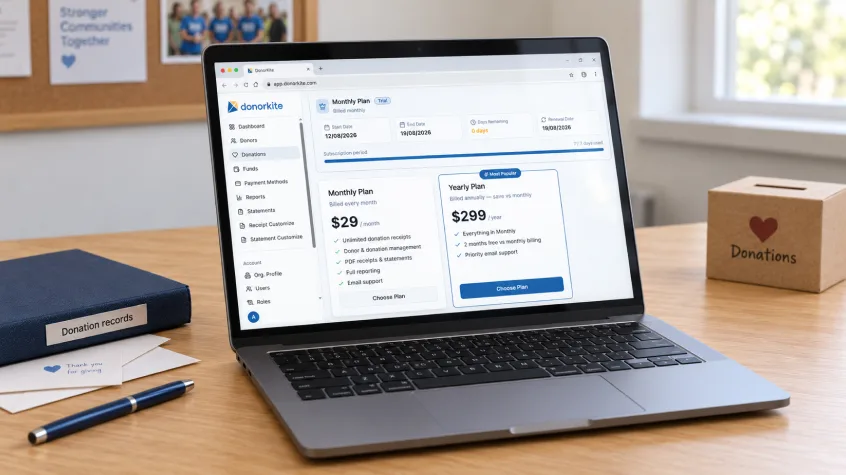
So, how much does donor management software cost? With DonorKite, you can choose a Monthly Plan at $29 per month or a Yearly Plan at $299 per year. The yearly subscription works out to approximately $24.92 per month, billed annually, and saves $49 compared with 12 monthly payments.
Both plans include unlimited donation receipts, donor and donation management, PDF receipts and statements, and full reporting. The Monthly Plan includes email support, while the Yearly Plan includes priority email support.
Understanding donor management software cost is about more than finding the lowest subscription price. The right choice should also make donor records, donation tracking, and receipt management easier for the people using it.
Here is how to evaluate donor management software pricing and decide which option makes sense for your organization.
DonorKite Pricing: Monthly and Yearly Plans
If you are looking for donor management software for small nonprofits, start by comparing the actual subscription cost and the features included.
Pricing and features | Monthly Plan | Yearly Plan |
Subscription price | $29 per month | $299 per year |
Billing frequency | Every month | Annually |
Monthly equivalent | $29 | Approximately $24.92, billed annually |
Cost over 12 months | $348 | $299 |
Savings with annual billing | — | $49 compared with 12 monthly payments |
Unlimited donation receipts | Included | Included |
Donor and donation management | Included | Included |
PDF receipts and statements | Included | Included |
Full reporting | Included | Included |
Support | Email support | Priority email support |
The yearly monthly equivalent is a budgeting calculation, not a monthly payment option. The Yearly Plan is billed at $299 annually.
This gives small organizations two ways to manage the expense: a smaller recurring payment or a lower total subscription cost over a full year.
Register Now to try DonorKite for free and explore the donor, donation, and receipt workflow before choosing a paid plan.
Monthly or Yearly: Which Plan Makes More Sense?
The right billing option depends on your cash flow and how confidently your team expects to use the software throughout the year.
Choose Monthly Billing for a Smaller Initial Payment
At $29 per month, the Monthly Plan spreads the subscription cost across the year. This can suit an organization that prefers monthly operating expenses or wants more experience with the system before choosing annual billing.
You still receive the core tools listed in the pricing table, including unlimited donation receipts, PDF receipts and statements, and reporting.
When budgeting for donor management software cost for small nonprofits, remember that 12 payments of $29 total $348. Reviewing the full-year figure makes it easier to compare monthly and annual billing fairly.
Choose Yearly Billing for a Lower Annual Cost
The Yearly Plan costs $299 and includes everything in the Monthly Plan, plus priority email support.
The calculation is straightforward:
$29 × 12 months = $348
$348 − $299 = $49 saved with yearly billing
That is approximately a 14% saving compared with paying monthly for a full year.
For an organization that has tested the software and expects to use it regularly, annual billing can make affordable donor management software more economical. The trade-off is paying the annual subscription upfront.
What Does Your Donor Management Software Subscription Include?
A useful way to assess donor management software pricing is to connect each included feature to work your team already performs.
A subscription becomes easier to evaluate when you can see which tasks it supports and where it may reduce repeated effort.
Donor and Donation Management
Donor information is much more useful when it stays connected to contribution records. Your team should be able to understand who gave, what was received, and where to find the relevant details.
DonorKite includes donor and donation management in both plans. This supports a central process for maintaining donor records and recording contributions instead of relying on disconnected files.
When evaluating an affordable nonprofit CRM, test practical tasks such as locating an existing donor and reviewing their giving history. Those daily actions matter more than a long feature list. For a closer look at the features small teams need, read our guide to the best CRM for small nonprofits.
Unlimited Donation Receipts
Receipt creation is an ongoing responsibility. As donation activity increases, your organization needs a process that remains manageable.
Both DonorKite plans include unlimited donation receipts. That means the advertised receipt allowance does not require choosing a higher plan simply to create more receipts.
For teams comparing donation receipt software, this is a useful feature to evaluate alongside the quality of the receipt workflow. Check how easily staff can create a receipt, review its details, and find it again when a donor contacts you. Our guide to donation receipt software for nonprofits explores how receipts connect with donor and contribution records.
PDF Receipts and Statements
Both plans include PDF receipts and statements. Receipts document individual contributions, while statements help present donation information together for review.
These tools can be particularly useful when your team regularly prepares donor summaries or responds to requests for giving records.
During a trial, review a sample output and check that it presents the information your organization needs. Confirm that the available fields and your own recordkeeping process suit the requirements that apply to your organization.
Full Reporting
Reporting is included in both plans, so your evaluation should focus on how the available reports support your actual work.
Start with the questions your team asks most often: how much was recorded during a period, which contributions belong to a particular fund, and what information is needed for an internal review.
Good donation management software should help make those records easier to understand. Test the reports you need before deciding whether the system fits your process.
Email Support and Priority Email Support
The Monthly Plan includes email support. The Yearly Plan includes priority email support.
Support matters when staff or volunteers need help understanding a feature or completing a task. Consider who will administer the software and how comfortable they are learning a new system.
Priority support is an additional benefit of annual billing, but do not assume a particular response time unless it is specified in the service terms.
Why Offline Donation Tracking Matters for Small Nonprofits
Many organizations receive contributions through cash, checks, bank transfers, and other methods outside their donor management system. Those gifts still need to be recorded and connected to the correct donor.
Offline donation tracking software helps organize that administrative work. The objective is to maintain clear records of money already received and support the receipt process that follows.
DonorKite is designed for managing offline donation records. It is a cloud-based system; “offline” describes the donations being recorded, rather than an ability to use the software without an internet connection.
When testing donation tracking software, follow a realistic sequence:
Find or add the donor.
Record the contribution and relevant details.
Review the receipt information.
Send the receipt through the available email workflow.
Find the donation again when checking the donor’s history.
This is a practical way to assess offline donation tracking software because it reflects the work your team will repeat throughout the year. For more detail on organizing contributions, see our guide to charitable donation tracking software.
How Email Donation Receipts Improve the Workflow
Creating a receipt is only part of the task. Your team also needs a consistent way to deliver it and respond when a donor asks for another copy.
The ability to email donation receipts can reduce the steps involved in preparing and sending individual acknowledgments. DonorKite supports emailed donation receipts as part of its donation workflow.
During your trial, use a test record and check the complete process. Review the donor’s email address, inspect the receipt, and confirm how your team can locate it afterward.
Organizations comparing donation receipt software should evaluate both document creation and delivery. A well-designed PDF is useful, but the surrounding process also needs to work for staff and volunteers.
Register Now to explore how DonorKite handles donor records, donation tracking, and emailed receipts.
What Else Affects the Total Cost of Donor Management Software?
The subscription price gives you a starting point. The total cost of donor management software also depends on the resources your organization needs to introduce and maintain it.
Preparing Existing Records
Before moving donor information, allow time to check names, email addresses, duplicate records, and historical donations.
Even a straightforward system cannot resolve every issue in the original data without your team’s input. Identify who will prepare the records and who will check them after migration. Our guide on how to move donor records from Excel to donor management software can help your team plan that transition.
When comparing nonprofit CRM pricing, ask whether any migration assistance you need is included or separately quoted.
Training Staff and Volunteers
Have the people who will use the software test it. A finance coordinator may approach the system differently from an occasional volunteer.
Ask each person to complete a few routine tasks and note where instructions are needed. Include that learning time in your implementation plan.
The right donor management software for small nonprofits should be manageable for the team you have, including the people who may take over the work later.
Existing Payment and Accounting Tools
Recording a donation and processing a payment are different functions. If your organization uses a bank, card terminal, or external payment service, review those costs separately.
Similarly, identify which accounting or communication tools you will continue using. Donation management software may simplify donor administration while other systems remain necessary for separate responsibilities.
Billing Currency and Applicable Charges
Organizations in the United States, Canada, the United Kingdom, Australia, and New Zealand should confirm the billing currency and any applicable charges before subscribing.
When comparing subscriptions quoted in different currencies, convert them into the same budgeting currency. This helps your team make a fair comparison of nonprofit CRM pricing.
Free vs Paid Donor Management Software
The free vs paid donor management software decision comes down to the process your organization needs and the work involved in maintaining it.
A spreadsheet or free tool may be sufficient when donation activity is limited and one person can keep the records accurate. As the work grows, manual receipt preparation and repeated data entry can become harder to manage. If you are deciding whether to keep using spreadsheets, our donor management software vs Excel comparison explains the practical differences.
A paid subscription deserves consideration when your team regularly encounters problems such as:
Donor details spread across several files.
Repeated entry of the same information.
Delays preparing or sending receipts.
Difficulty finding earlier contributions.
Time-consuming preparation of donation summaries.
Confusion when volunteers hand over responsibility.
An affordable nonprofit CRM should help address the problems that matter to your organization. Paying for software only makes sense when its features and workflow fit the work you need to do.
Also distinguish a free trial from a permanently free plan. A trial gives your team time to assess a paid product before choosing a subscription.
How to Choose the Best Affordable Donor Management Software for Small Nonprofits
The best affordable donor management software for small nonprofits combines a sustainable price with a process your team can use consistently.
Use these five checks before making a decision.
1. Define Your Essential Tasks
List the work the software must support: maintaining donor information, recording contributions, preparing receipts, emailing receipts, and reviewing donation records.
Use that list to keep the evaluation focused. Our donor management software vs nonprofit CRM guide can also help you decide how broad a system your organization needs.
2. Compare the Full-Year Cost
Review the annual commitment instead of relying only on the advertised monthly figure.
With DonorKite, the choice is $348 across 12 monthly payments or $299 through the Yearly Plan. Annual billing saves $49, while monthly billing spreads the payments out.
3. Test a Complete Donation Workflow
Use sample data to test a donation from initial entry through receipt delivery and reporting.
This helps establish whether affordable donor management software is also practical for your staff and volunteers.
4. Review Support and Subscription Terms
Understand the available support, renewal arrangements, cancellation terms, and how your organization can retrieve its records.
Make the decision with those details in hand, especially before an annual payment.
5. Choose Based on Actual Use
A system’s value comes from the work it helps your organization complete.
Focus on whether the donor records are easy to maintain, donation details are easy to retrieve, and receipts can be handled consistently. These are useful measures of value when comparing donor management software cost.
Get Started With DonorKite
For small nonprofits seeking a clear subscription choice, DonorKite offers a $29 Monthly Plan and a $299 Yearly Plan. Both include unlimited donation receipts, donor and donation management, PDF receipts and statements, and full reporting. The yearly option adds priority email support and saves $49 over 12 monthly payments.
Choose the billing option that fits your budget after testing the tasks your team performs most often.
Whether you are organizing donor records, looking for donation tracking software, or improving how you email donation receipts, start by seeing how the workflow fits your organization.
Register Now to try DonorKite for free and choose the plan that works for your team.