
Managing receipts for tax deductible donations is an important responsibility for small nonprofits in the United States. A nonprofit must record every contribution correctly, maintain accurate donor information and provide suitable documentation when donors request proof of their charitable gifts.
Many organizations still depend on spreadsheets, Word templates and manually saved PDF files to create a tax deductible donation receipt. This process can become difficult when the nonprofit receives contributions from many donors, manages different funds or needs to prepare year-end giving records.
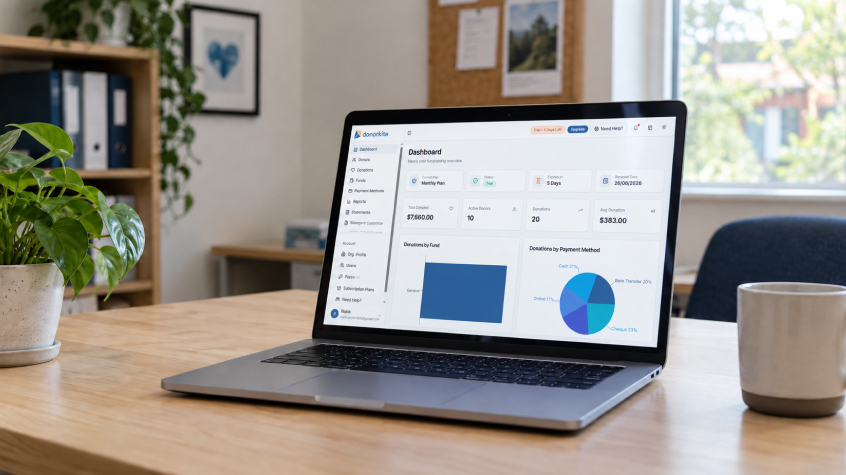
DonorKite helps organizations manage donor records, offline donations, donation receipts, receipt numbers, email delivery, donor giving history and donor statements in one organized system. It is designed for recording and managing contributions after they are received through methods such as cash, checks or bank transfers. DonorKite is not an online payment processor or payment gateway.
Small nonprofits looking for an organized way to manage receipts for tax deductible donations can start DonorKite’s seven-day free trial and explore how donor, donation and receipt records can work together.
What Are Receipts for Tax Deductible Donations?
Receipts for tax deductible donations are written or electronic documents that acknowledge a contribution received by a nonprofit organization. They provide the donor with important information about the organization, the contribution date and the amount or description of the donation.
A receipt for tax deductible donation purposes can be provided as a paper document, PDF file or email. The format may differ, but the information must accurately represent the contribution that the nonprofit received.
A tax deductible donation receipt does not automatically make a contribution deductible. The donor must contribute to an eligible organization and meet the applicable federal tax requirements. The nonprofit must also record the donation accurately and provide the appropriate acknowledgment based on the type and value of the gift.
A useful receipt process connects the tax deductible donation receipt to:
The donor’s profile
The donation date
The contribution amount
The payment method
The fund or campaign
The receipt number
The receipt delivery status
The donor’s giving history
This is why donation receipt software should do more than create a document. It should help the nonprofit manage the donation records behind the document.
Why Small Nonprofits Need an Organized Receipt Process
Small nonprofits often operate with limited staff and volunteers. One person may be responsible for donor management, donation entry, receipt preparation, email communication, reporting and year-end summaries.
When each task is handled in a different file, information can easily become inconsistent. A donor’s name may be entered differently in two spreadsheets. A receipt may show the wrong amount. A previous donor receipt may be difficult to locate. Staff may also lose track of which contributions have already received donor receipts.
These problems can affect both daily administration and donor service.
A structured receipt process helps a nonprofit:
Create consistent donation receipts for nonprofits
Maintain accurate donation records
Reduce duplicate donor profiles
Track cash, check and bank-transfer contributions
Assign donations to the correct fund
Maintain organized receipt numbers
Send email donation receipts
Find older receipts when donors request them
Prepare donor statements
Create year-end donation reports
The goal is not simply to create more receipts. The goal is to maintain a complete record of the contribution from the moment it is received until the receipt is delivered and stored.
IRS Donation Receipt Requirements for U.S. Nonprofits
Understanding the IRS donation receipt requirements is important for organizations that issue receipts for charitable contributions.
The documentation required for a contribution depends on several factors, including:
Whether the donation was monetary or noncash
The amount or value of the donation
Whether the donor received goods or services
Whether the contribution was made as part of a fundraising event
Whether the organization is qualified to receive deductible contributions
For monetary contributions, donors generally need a bank record or written communication from the organization showing the organization’s name, contribution date and amount.
For a single contribution of $250 or more, the donor generally needs a contemporaneous written acknowledgment from the nonprofit. The acknowledgment should contain specific information about the contribution and whether the donor received goods or services in return.
The nonprofit should also maintain its own records. Donation receipt software can help organize the information that supports the tax deductible donation receipt, but the organization remains responsible for reviewing the rules that apply to its circumstances.
Donation Receipt Requirements for Contributions Under $250
A monetary contribution under $250 still needs to be recorded accurately. Donors generally need a bank record or written communication from the nonprofit showing:
The nonprofit’s name
The date of the contribution
The amount contributed
A receipt, letter or email may serve as the written communication.
For example, a nonprofit may receive a $50 cash contribution, a $100 check or a $200 bank transfer. Each contribution should be recorded with the correct donor, date, amount and payment method.
Although smaller contributions may not require the same acknowledgment as a single contribution of $250 or more, maintaining organized donation records is still important. Donors may request a copy of a receipt later, and nonprofit staff may need the information for donor statements or internal reporting.
A tax deductible receipt should not be created from memory or from an incomplete spreadsheet. It should be prepared from the contribution information stored in the organization’s donation management system.
The IRS $250 Donation Rule
The IRS $250 donation rule is one of the most important requirements for organizations preparing a tax deductible donation receipt.
A donor generally cannot claim a federal charitable deduction for a single contribution valued at $250 or more without a contemporaneous written acknowledgment from the qualified organization.
The acknowledgment should generally include:
The organization’s name
The amount of a cash contribution
A description of property contributed
A statement confirming whether goods or services were provided
A description and good-faith estimate of the value of goods or services provided, if applicable
The acknowledgment may be provided separately for each donation. In some circumstances, one annual statement may summarize multiple contributions, but the organization should still preserve the individual donation records supporting that summary.
Separate donations under $250 are generally not combined to reach the $250 threshold. For example, a donor’s separate weekly contributions of $25 are not automatically treated as one $325 contribution for this purpose.
This makes accurate donation history important. The nonprofit should be able to identify each contribution, its date and its receipt information.
501(c)(3) Donation Receipt Requirements
Organizations researching 501(c)(3) donation receipt requirements should understand that a receipt is part of a wider documentation process.
A nonprofit should first confirm that it is eligible to receive tax-deductible contributions. It should then maintain accurate donor and donation records and provide the acknowledgment information required for the contribution.
A 501(c)(3) donation receipt may include:
The nonprofit’s legal name
The donor’s name
The date of the contribution
The amount of cash donated
A description of noncash property
A statement confirming whether goods or services were provided
The value of goods or services received by the donor, when applicable
The organization should avoid using language that guarantees a tax deduction. A better approach is to provide accurate contribution information and explain that the donor is responsible for determining how the donation applies to their tax return.
Tax deductible donation receipt software can help standardize the receipt workflow, but it cannot determine whether a specific donation qualifies for a deduction.
What Should Be Included in a Tax Deductible Donation Receipt?
A tax deductible donation receipt should clearly identify the nonprofit and the contribution. The information included may vary depending on the donation type, but most receipts should contain several important details.
Organization Details
Include the nonprofit’s legal name and relevant contact information. The organization should use consistent information on its donor receipts, statements and internal donation records.
Donor Details
Include the donor’s name and available contact information. Accurate donor data is essential for creating future receipts and maintaining donor giving history.
If the donor contributes several times during the year, every donation should remain connected to the same donor profile where appropriate. This helps staff prepare accurate donor statements and respond to receipt requests.
Contribution Information
Include the contribution date and amount. If the donation was made through a fund or campaign, that information can also be recorded.
The contribution date should represent when the nonprofit received the donation. The date it was entered into the system may be different.
Payment Method
The nonprofit may record whether the contribution was received by cash, check or bank transfer. This information helps the organization maintain complete donation records and review how contributions were received.
DonorKite records the payment method as part of the donation record. It does not process the payment or act as an online payment gateway.
Goods or Services Statement
The receipt should explain whether the nonprofit provided goods or services in return for the contribution. If no goods or services were provided, the receipt can include a statement confirming that fact.
If the donor received something in exchange for the payment, the organization may need to describe the benefit and provide a good-faith estimate of its value.
Quid Pro Quo Donation Disclosure Requirements
A quid pro quo contribution occurs when a donor makes a payment partly as a donation and partly in exchange for goods or services.
For example, a donor may pay $150 to attend a nonprofit dinner. If the fair market value of the meal is $50, the potentially deductible portion may be limited to the amount exceeding the value of the meal.
The IRS receipt requirements for benefits received should be considered whenever a donor receives goods, services, benefits or privileges in connection with a contribution.
A quid pro quo donation disclosure generally needs to explain:
That the deductible amount is limited to the excess over the value of the benefit
The good-faith estimate of the goods or services provided
The connection between the payment and the benefit received
The organization should record whether a benefit was provided before preparing the tax deductible receipt. A receipt system can preserve this information, but it cannot make the tax decision for the nonprofit.
Non-Cash Donation Receipt Requirements
Noncash contributions include items such as clothing, furniture, supplies, equipment and other property. The non-cash donation receipts process may require different information from a cash donation receipt.
For a single noncash contribution valued at $250 or more, the donor generally needs a contemporaneous written acknowledgment. The nonprofit should provide a description of the donated property but generally should not determine or state its fair market value on the acknowledgment.
Additional requirements may apply to noncash contributions above certain values. The donor may need additional forms, records or an appraisal depending on the type and value of the property.
The organization should record:
The donor’s name
The date the property was received
A clear description of the property
Any relevant internal remarks
Whether goods or services were provided
The receipt or acknowledgment connected to the donation
A standard cash receipt template should not be used automatically for every noncash gift. Staff should review the contribution before preparing a charitable donation receipt.
Why Manual Receipt Templates Become Difficult to Manage
A tax receipt template may be useful when a nonprofit receives only a few contributions. However, manual templates create additional work as the organization grows.
Common problems include:
Copying donor information repeatedly
Creating duplicate donor records
Entering an incorrect donation amount
Using the wrong contribution date
Assigning duplicate receipt numbers
Forgetting to send a receipt
Losing the receipt delivery record
Searching through folders for previous donor receipts
Rebuilding annual totals manually
Preparing donor statements from multiple spreadsheets
A standalone receipt generator may create one document, but it does not always preserve the donor and donation information behind that document.
This is why small nonprofits often need a complete system that combines donor database software, donation management software and donation receipt software.
How Donor Database Software Supports Receipt Accuracy
A donor database software system gives the organization one structured place to maintain donor information.
A useful donor database for nonprofits should help staff:
Find an existing donor
Add a new donor
Update donor contact information
Reduce duplicate profiles
View donor giving history
Connect multiple donations to one donor
Locate older donor receipts
Prepare donor statements
Receipt accuracy depends heavily on the quality of the donor information stored in the system. If the donor’s name or email address is incorrect, the receipt may also contain incorrect information or be delivered to the wrong address.
When donor records and donation records are connected, staff can prepare a receipt from information that has already been reviewed and stored.
How Donation Management Software Connects Contributions and Receipts
Donation management software helps organizations record the details surrounding each contribution.
A complete donation record may include:
Donor name
Donation date
Contribution amount
Fund
Campaign
Payment method
Internal remarks
Receipt number
Receipt delivery status
This information helps staff understand the purpose and history of each contribution. It also ensures that the tax deductible donation receipt is connected to the correct donation.
Donation management software should work together with donation tracking software. The organization should be able to review not only the total amount received but also which donor made the contribution, which fund received it and whether the receipt was created and delivered.
Offline Donation Tracking for Small Nonprofits
Many small nonprofits receive contributions by cash, check or bank transfer and then record those contributions internally. This makes offline donation tracking software for nonprofits useful for organizations that do not need their receipt system to process payments.
Offline donation tracking may include:
Recording cash donations
Recording check donations
Recording bank transfers
Assigning payment methods
Linking donations with funds
Tracking receipt numbers
Maintaining donor history
Reviewing donation reports
DonorKite is designed for this type of donation administration. The nonprofit receives the contribution through its existing method and then records and manages it in DonorKite.
This distinction is important. DonorKite does not collect online donations, process payments or operate as a payment gateway. It helps the organization manage the donor and donation records after the contribution has been received.
Automatic Donation Receipt Software for Growing Organizations
Automatic donation receipt software can help reduce repeated manual work.
A structured workflow allows staff to:
Find or create the donor record.
Record the donation.
Add the fund and payment method.
Review the contribution details.
Generate the donation receipt.
Customize the receipt.
Send the receipt by email.
Preserve the receipt with the donation history.
This process reduces the need to copy the same information into separate documents. It also helps the organization maintain more consistent donor receipts as contribution volume increases.
Automatic receipt numbering is another important capability. Manual numbering can lead to skipped numbers, repeated numbers or inconsistent formats. Organized receipt numbering makes it easier to find a specific tax deductible receipt later.
How DonorKite Helps Manage Receipts for Tax Deductible Donations
DonorKite brings donor management, donation management and receipt administration into one connected workflow.
Organizations can use DonorKite to:
Create and maintain donor profiles
Record offline donations
Manage cash, check and bank-transfer contributions
Connect donations with funds and campaigns
Record payment methods
Add internal remarks
Generate PDF donation receipts
Customize receipts with logos and signatures
Organize receipt numbers
Send email donation receipts
Maintain receipt delivery history
Review donation history
Prepare annual or custom donor statements
Create donation reports
Import and export donor and donation records
The workflow begins with the donor record and continues through the contribution, receipt and giving history. This helps prevent the receipt from becoming a disconnected file that staff cannot easily locate later.
DonorKite can help prepare and manage a tax deductible donation receipt, but it does not determine whether the contribution qualifies for a tax deduction. The nonprofit remains responsible for reviewing its circumstances and using suitable receipt language.
Organizations looking for donation receipt software for nonprofits can try DonorKite free for seven days and review how the system fits their everyday receipt and donation workflow.
Donor Statements and Year-End Donation Records
Individual donor receipts document specific contributions. Donor statements provide a broader summary of a donor’s giving over a selected period.
A donor may ask for:
A list of contributions made during the year
Total donations to a specific fund
A record of previous donor receipts
A custom-period giving summary
A replacement copy of an earlier receipt
DonorKite supports annual and custom-period donor statements. These statements can be prepared from the donation records already maintained in the system.
Organizations may also need to prepare year-end donation reports for internal review and donor communication. When the donation records are complete, year-end reporting becomes easier because staff do not need to calculate totals manually from separate files.
A donor statement does not replace an individual tax deductible donation receipt. Instead, it provides a wider view of the donor’s contribution history.
Importing Donor Records From Spreadsheets
Some small nonprofits already have donor and donation information stored in Excel files. Moving this information into a structured system can help the organization reduce duplicate data entry and organize historical donation records.
A donor data import process should preserve important details such as:
Donor names
Email addresses
Phone numbers
Donation amounts
Donation dates
Funds
Payment methods
Receipt information
After importing records, staff should review the information for duplicate donors, missing details and inconsistent formatting.
A nonprofit CRM or CRM for nonprofits should make donor information easier to manage without separating it from donation history. When donor management software and donation receipt software are connected, staff can use historical information to prepare future donor receipts and donor statements more efficiently.
Choosing Donor Management Software for Small Nonprofits
When choosing donor management software for small nonprofits, organizations should look beyond contact storage.
The system should support the complete relationship between:
Donors
Donations
Funds
Campaigns
Payment methods
Receipts
Delivery history
Donor statements
Reports
A nonprofit CRM should help staff understand who gave, when they gave, how much they gave and which receipts are connected to the contribution.
The best system for a small nonprofit is not necessarily the one with the longest feature list. It is the system that staff and volunteers can use consistently for donor management, offline donation tracking, donation records and donor receipts.
When Should a Nonprofit Move to Donation Receipt Software?
A nonprofit may be ready for donation receipt software when manual processes begin creating delays or errors.
Common signs include:
Staff cannot quickly locate older receipts
Donation records are spread across several spreadsheets
Donor profiles contain duplicate information
Receipt numbers are difficult to control
Donor statements take too long to prepare
Year-end reports require manual calculations
Staff repeatedly copy donor information
Email receipt delivery is not tracked
Different volunteers use different receipt formats
Donors request corrections or replacement receipts regularly
These problems usually indicate that the nonprofit needs more than a receipt template. It needs a connected system for donor records, donation management, receipt creation and reporting.
Manage Donation Receipts With DonorKite
Receipts for tax deductible donations are easier to manage when they are connected to accurate donor and donation records. A small nonprofit should be able to record the contribution, assign the correct fund and payment method, create the tax deductible receipt, send it by email and find the information again later.
Donation receipt software for nonprofits can reduce manual data entry and help staff maintain more consistent donor receipts. When it also includes donor management software, donation management software, offline donation tracking, donor statements and reporting, the organization gains a more complete view of its giving activity.
DonorKite helps small nonprofits manage offline contributions, donor records, donation receipts, receipt numbering, email delivery, donor giving history and reporting in one place. Create your DonorKite account and start the seven-day free trial.